Offline Protocol partners with Wendy Labs: WendyOS boards that talk with no internet
TL;DR
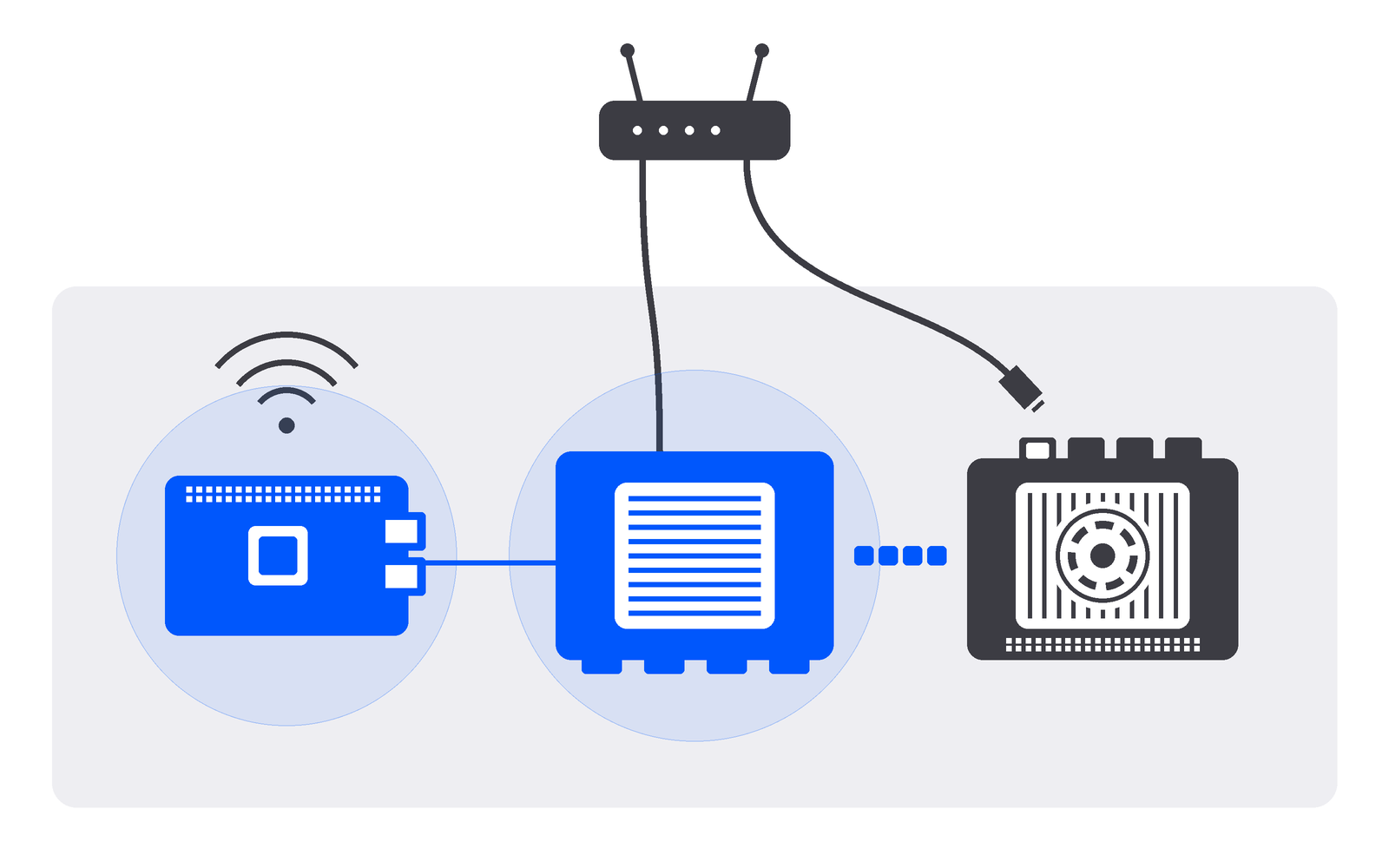
Offline Protocol and Wendy Labs have partnered, and Offline Protocol is now a WendyOS integration, documented on Wendy's site. In Wendy's build, a Dragonwing IQ9, a Raspberry Pi 5 and a Jetson Orin Nano with no internet find each other, hold messages and relay.
Offline Protocol and Wendy Labs have partnered, and Offline Protocol is now an integration on WendyOS, Wendy’s operating system for robots and physical AI devices. Apps on NVIDIA Jetson, Raspberry Pi and Qualcomm Dragonwing boards running WendyOS can now find each other, trust each other and exchange messages and service calls directly, end-to-end encrypted, with or without the internet. Wendy documents the integration on its own site, with a step-by-step tutorial on the Wendy blog and a video build on YouTube.
In the video, Lizzy from Wendy Labs takes three computers that can’t reach the internet, a Qualcomm Dragonwing IQ9, a Raspberry Pi 5 and an NVIDIA Jetson Orin Nano, and gets them talking with about 100 lines of Python on the Offline Protocol SDK, deployed to all three with WendyOS. The boards find each other without being told where to look, encrypt everything with keys they made themselves, hold messages for a board that is unplugged and carry a message through the board in the middle that can’t read it. That is the operating model we build for: machines on a site coordinate directly, the site needs one uplink rather than one per device, and when a link drops the work carries on and nothing is lost. Thank you to Lizzy and the Wendy Labs team for building it, filming it and writing it up so clearly.
WendyOS and Offline Protocol for physical AI devices
 Wendy Labs@wendylabsinc
Three computers on a table, and none of them can reach the internet. Lizzy builds an app with Offline Protocol on WendyOS that lets them find each other, encrypt everything they say, and hold on to messages when one of them goes dark. It takes about 100 lines of Python.
WendyOS is Wendy Labs’ operating system for robotics and physical AI devices. It runs on NVIDIA Jetson, Raspberry Pi and Qualcomm Dragonwing boards, packages each app as a container that declares what it may use in a wendy.json file, and deploys it with wendy run, with updates that roll back on their own. Wendy Labs builds the stack around it too: developer tools, simulation, and data and fleet management in Wendy Cloud.
Offline Protocol is the layer that lets those devices talk to each other and to the phones around them. Each device gets its own identity, finds the devices near it, opens end-to-end encrypted sessions with them and delivers messages over whatever path exists. In Wendy’s words, Wendy gets your app onto the hardware, and Offline Protocol lets the hardware talk when the network won’t. The SDK installs from PyPI inside the app’s container, and WendyOS gives that container the host network and the persistent storage it asks for, so nothing else sits between them.
A WendyOS app in three files
The app, called Table Talk, is three files: wendy.json, a Dockerfile and app.py. The wendy.json asks WendyOS for two things, the host network, because multicast DNS discovery doesn’t leave a container’s private network, and a persistent volume, which keeps the board’s identity and its undelivered messages across deploys:
{
  "appId": "sh.wendy.examples.table-talk",
  "version": "0.1.0",
  "platform": "linux",
  "entitlements": [
    { "type": "network", "mode": "host" },
    { "type": "persist", "name": "table-talk-data", "path": "/data" }
  ]
}
All three boards are 64-bit Arm, so one image from one Dockerfile runs on every one of them. It starts from Debian’s python:3.12-slim, because the SDK’s Linux wheels need glibc 2.34 or newer, and installs the SDK with its local network extra:
FROM python:3.12-slim
ENV PYTHONUNBUFFERED=1
WORKDIR /app
RUN pip install --no-cache-dir 'offline-protocol-sdk[lan]==0.32.0'
COPY app.py .
CMD ["python", "app.py"]
app.py creates a ProtocolManager with the gateway profile, turns on required encryption, automatic key exchange and store and forward for pending messages, and starts a peer stream that listens on port 7878, advertises itself and looks for other boards. There is no account and no API key. Every five seconds each board sends a numbered message to every board it knows, carrying its name and the boards it has heard of, so boards learn about each other even when they can’t hear each other directly. Everything the SDK does arrives as one of five events: neighbor_discovered, secure_session_established, message_received, message_delivered and message_relayed. Before deploying, wendy device sync-time sets every board’s clock from a signed timestamp, since keys are checked against the time and there is no time server on a network with no internet.
Device discovery on a local network with no internet
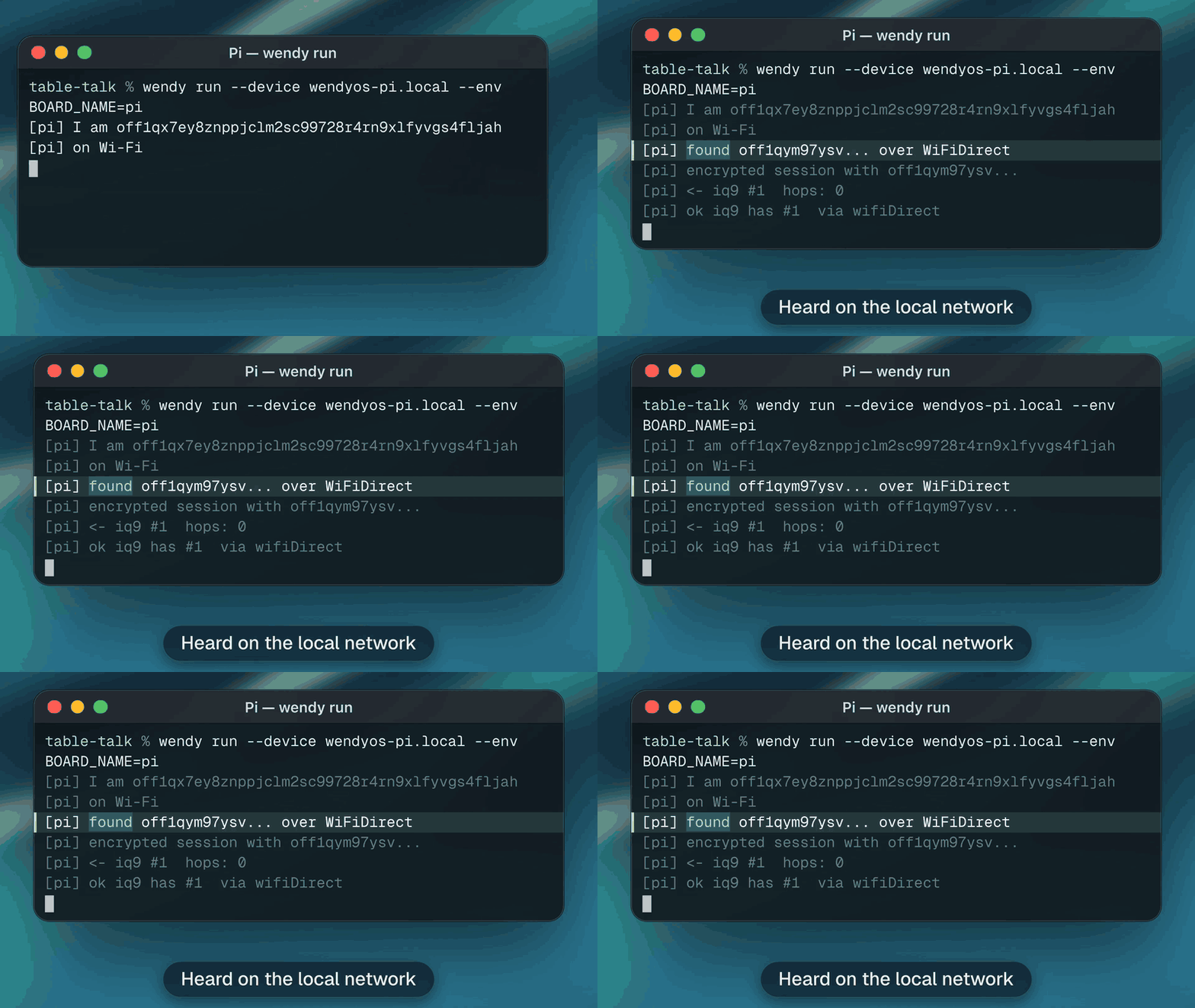
wendy run --device wendyos-pi.local --env BOARD_NAME=pi builds the container on the laptop, pushes it to the Pi, starts it and streams the logs back. The first line is the board’s address, derived from a key the board generated itself, with no sign-up and no server issuing it. Run the command again and the address is the same, because the identity lives on the persistent volume.
Deploying to the IQ9 is the same command with a different device and name. Nobody tells either board where the other is. The Pi hears the IQ9 on the local network, the two exchange keys with MLS, the IETF standard for encrypted group messaging, the IQ9’s first message arrives with zero hops, and the Pi gets a delivery receipt back. The Pi is on Wi-Fi and the IQ9 is on Ethernet, and to the SDK both are a TCP peer stream on the local network.
Store and forward when a board goes offline
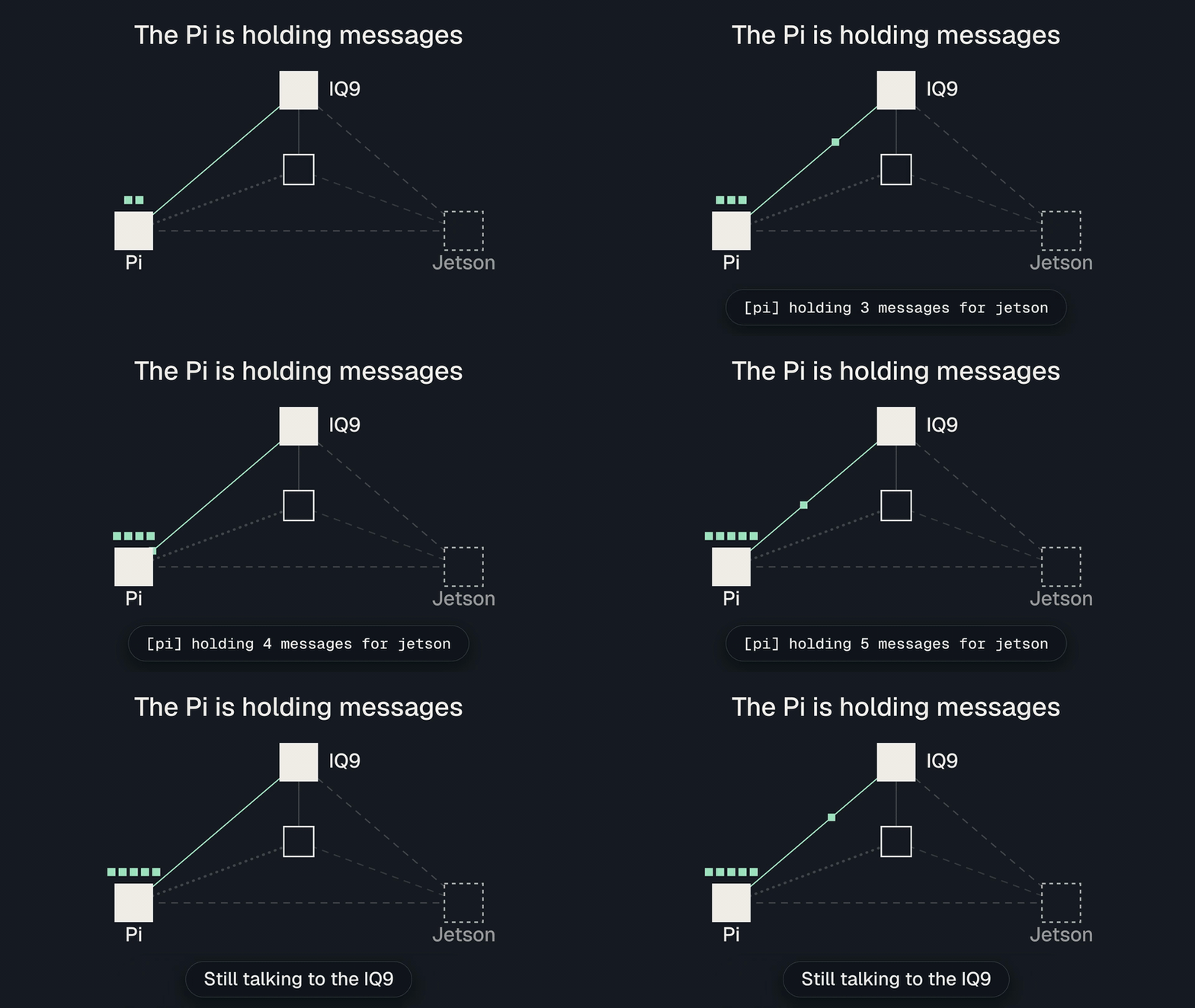
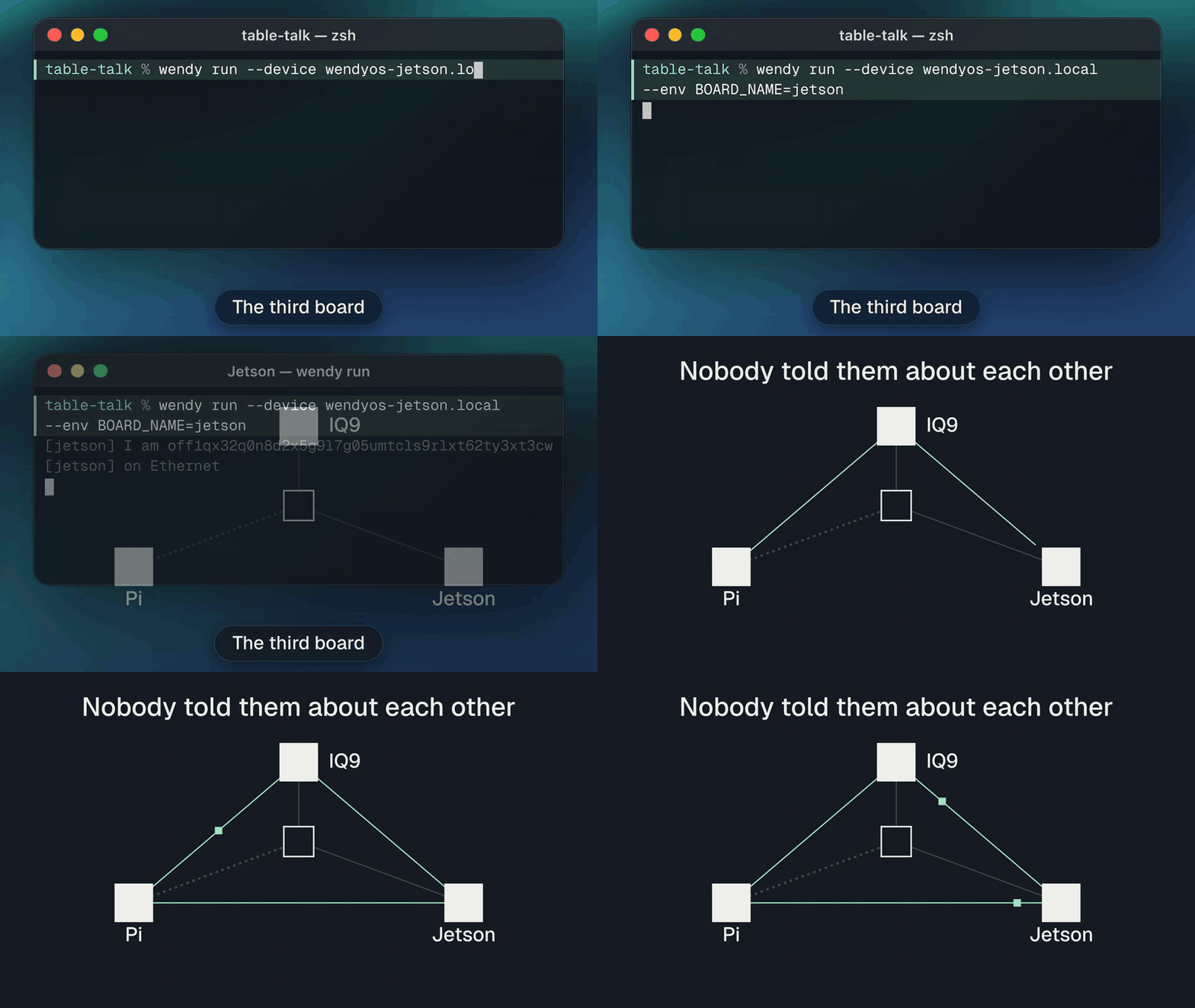
Lizzy pulls the Jetson’s network cable. The Pi and the IQ9 can’t reach it and have no idea when it will be back, so they keep addressing messages to it, and the SDK keeps each one on disk, waiting for a way through. The Pi reports holding three, four, then five messages for the Jetson, and carries on talking to the IQ9 as before.
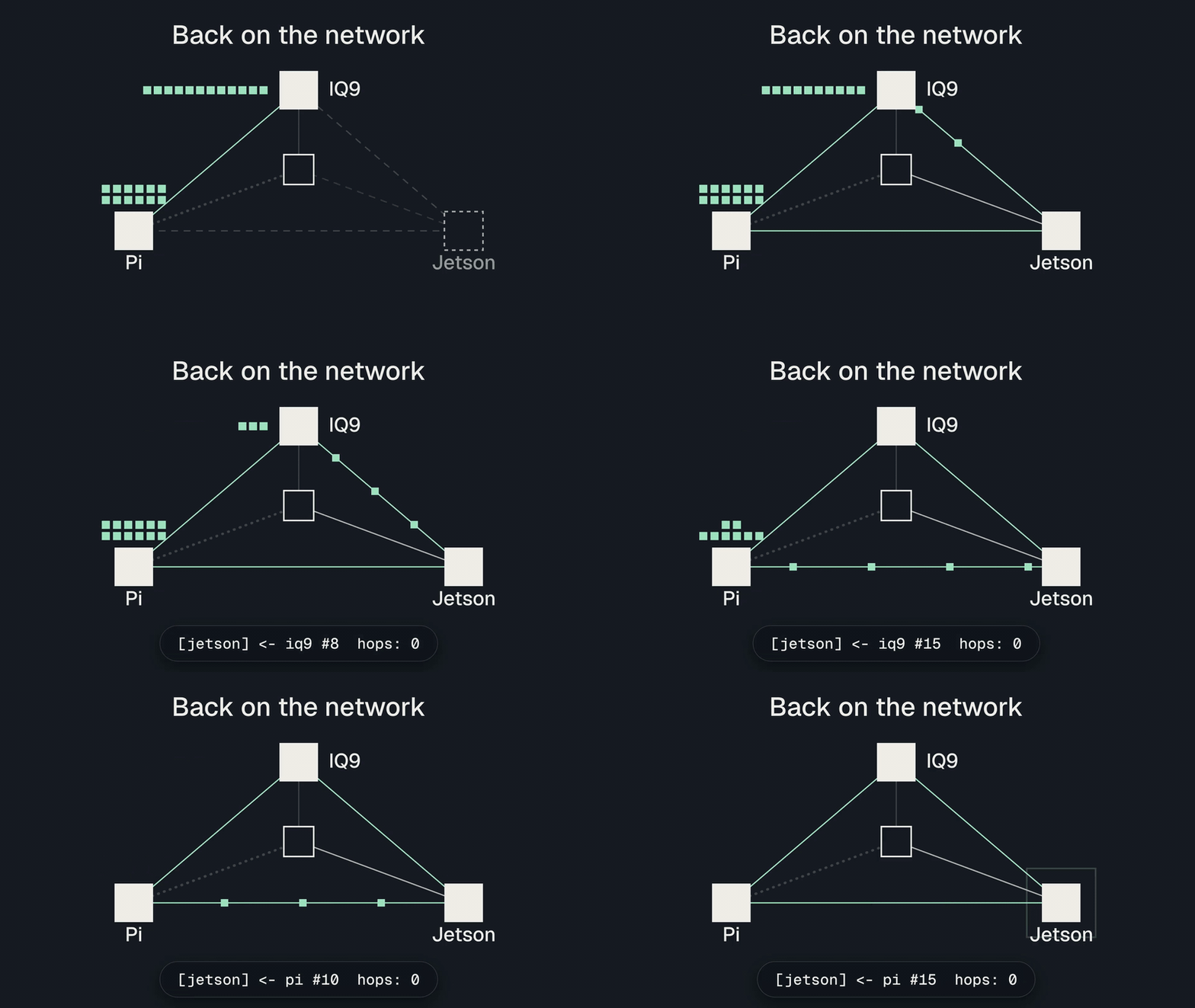
When the cable goes back in, everything the Jetson missed arrives from both boards as soon as it has a way back. The app has no retry code, no queue of its own and no reconnect call: store and forward is the SDK’s job.
Message buffer size and delivery order
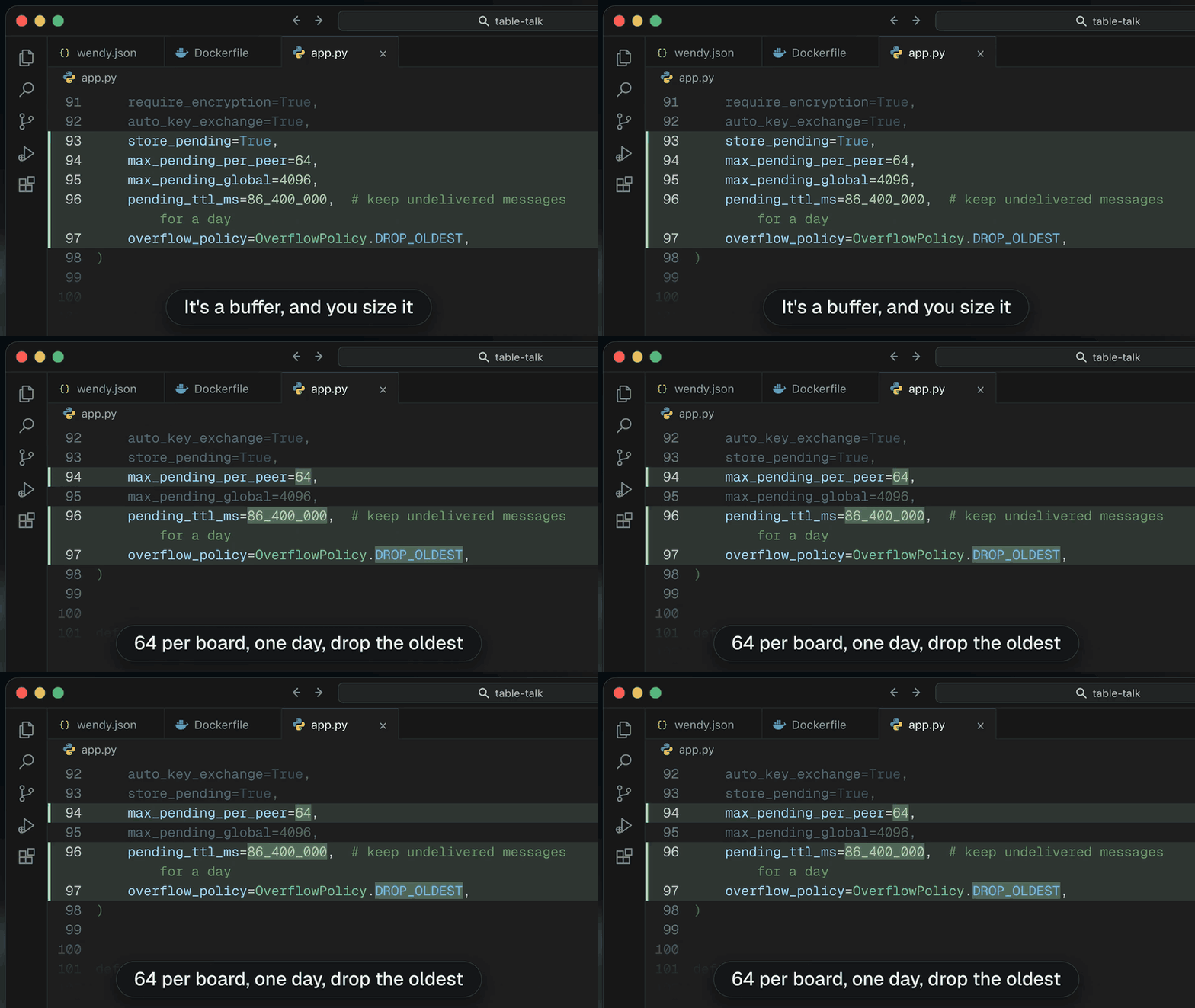
Held messages sit in a buffer that the app sizes. Table Talk keeps up to 64 messages for each board and 4,096 in total, holds them for one day, and drops the oldest when a board’s share is full. A machine that reports every few seconds and might be out of reach for an hour can keep more, and a command that is stale after a minute can expire sooner.
Every message in Table Talk carries its own sequence number, so when a backlog lands at once the receiving app can see exactly which messages it has and apply them in order. The same approach suits any command that has to run in sequence. For a work order or a robot command, the receiving app also writes the message down before acknowledging it, then sends its own receipt, so the sender knows the work was recorded as well as delivered.
Multi-hop relay through a board that can’t read the message
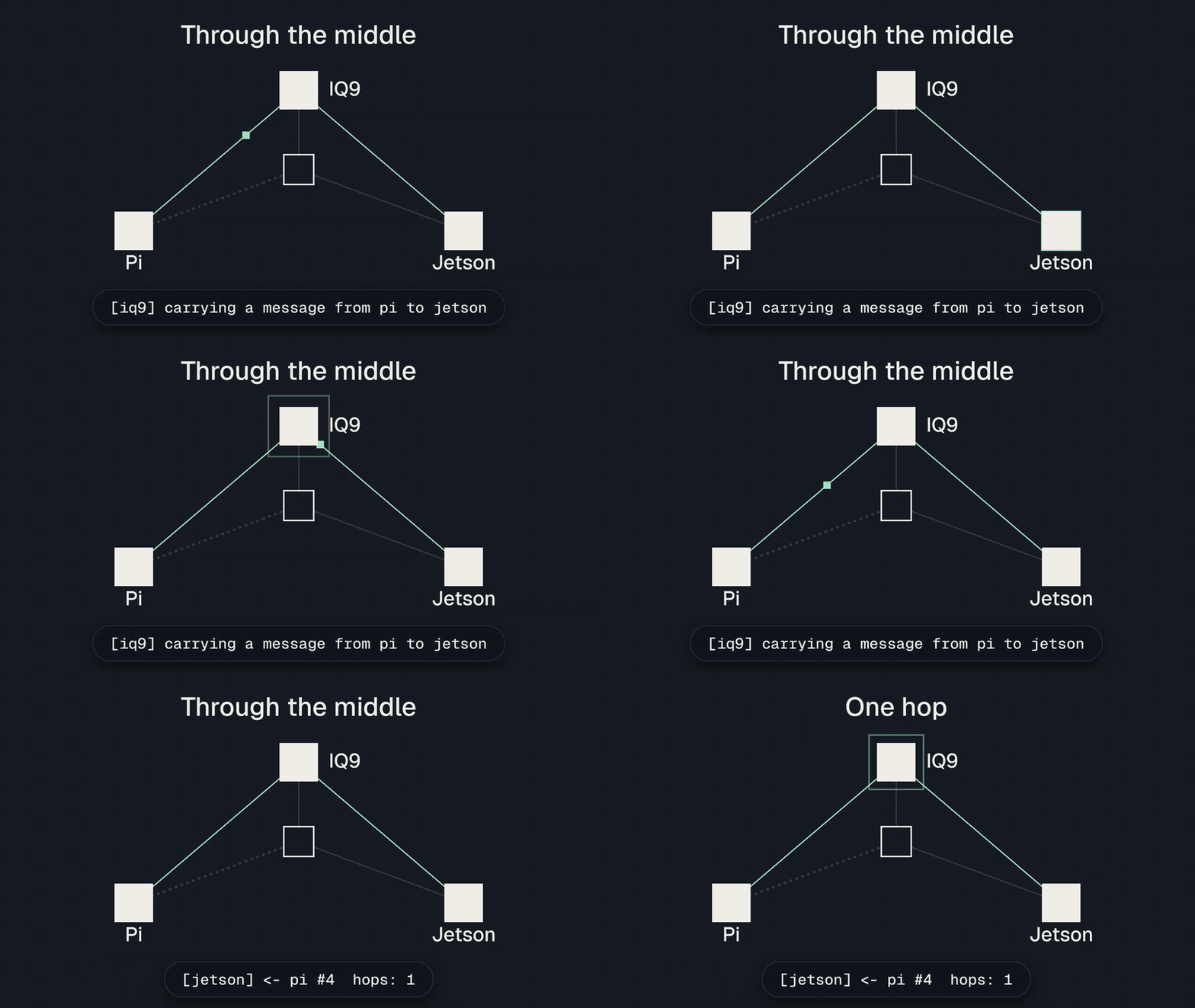
In a warehouse or on a site, two machines are often out of range of each other with a third between them. On the table, Lizzy draws that line with one environment variable, TALK_ONLY_TO, which turns off discovery and connects a board only to the addresses listed. The Pi and the Jetson each get one address, the IQ9’s.
The IQ9 logs that it is carrying a message from the Pi to the Jetson, and the Jetson receives it with one hop. The message left the Pi over Wi-Fi and reached the Jetson over Ethernet. The IQ9 carried it and can’t read it, because it is encrypted for the Jetson alone. Multi-hop relay needs nothing in the app: the config sets an initial hop limit of 8 and the boards do the rest.
Local coordination for robotics and edge fleets
The three boards on Lizzy’s table are a small version of a site full of machines: robots on a floor, cameras and inference boxes on a line, controllers at a pump station. With Offline Protocol on WendyOS, those machines:
- Coordinate where the work happens. A call or message between two devices is a hop over the local network or Bluetooth LE, answered in about a second, instead of a round trip through a distant server.
- Share one uplink per site. Devices reach each other directly, so a site needs one internet connection, not a data plan per device, and traffic between machines is never billed as cloud traffic.
- Keep working and lose nothing. When the uplink or a cable drops, the machines that can still hear each other carry on, and anything addressed to a machine that is away is delivered the moment it returns.
- Reach past their own radio range. Any device in between carries traffic for the others, end-to-end encrypted, so coverage grows with the fleet.
- Trust each other without a server. Every device has its own key, and every session and group is encrypted with MLS, so a machine on the site’s network can’t read or forge another’s traffic.
Wendy Net, Wendy’s private network for an organization’s devices, fits alongside it: Wendy Net joins devices running Wendy into one network, and Offline Protocol lives inside the app, holding messages until they can be delivered and reaching devices that don’t run Wendy at all, such as the phone in a technician’s pocket. The Learning Center covers how robots coordinate without a network, and the robotics page shows how we approach autonomous fleets.
Offline Protocol services on WendyOS beyond the demo
Table Talk uses messaging over the local network. The same SDK and the Offline Protocol service, deployed as one Wendy app per device, give a WendyOS fleet the rest of the platform:
| Capability | What it gives a WendyOS device |
|---|---|
| Services over HTTP | Any app on the device calls a service on another device with a normal HTTP request to the service’s front on loopback, end-to-end encrypted, from any language |
| Bluetooth LE and phones | The service advertises and connects through BlueZ, so devices talk with no network between them and phones running an app on the SDK join over Bluetooth LE, with no Wi-Fi and no pairing |
| Encrypted groups | Group messaging across devices and phones, with membership managed by MLS |
| File transfer | Files and media sent device to device |
| Replicated documents | Shared state (CRDTs) that every device edits locally and that merges cleanly after a network split |
| Every link from one service | The local network, Bluetooth LE, multi-hop through nearby devices, Wi-Fi Direct between Android phones and an internet relay, all managed by the SDK |
| Presence and delivery | Which devices are reachable now, and a receipt when each message is delivered |
The HTTP front is how apps that know nothing about the SDK take part. A provider registers a callback URL with a PUT to the local front, and a caller sends an ordinary request whose Host header names the service and the device, such as timeofday.<device>.offline.protocol.internal. The request is sealed, delivered to the other device and answered there, and a call to a device that is away keeps travelling and runs when it returns. Our HTTP front post covers it in full, and service discovery explains how a device finds who offers what.
Raspberry Pi 4 test results on WendyOS
Before Wendy’s three-board build, our team ran the Offline Protocol service on Raspberry Pi 4 boards running WendyOS, with a laptop and an Android phone as extra peers and no internet connection anywhere:
| Scenario | Result |
|---|---|
| HTTP call through a middle device (Pi A to laptop to Pi B) | 5 of 5 calls answered, in 0.7 to 1.4 s each |
| Called device offline for 45 s | The call waited and was answered 64 s after it was sent, inside the caller’s 90 s timeout |
| Bluetooth LE only, no local network | Calls answered in about 1 s |
| Encrypted group across every device | Every member sent and received, including the phone over Bluetooth LE |
Wendy’s build extends that to a Dragonwing IQ9, a Raspberry Pi 5 and a Jetson Orin Nano, running one app from one container image on all three.
Running Offline Protocol on WendyOS
You need WendyOS boards that wendy discover can see, the Wendy CLI on a laptop, and a router. The boards never need internet access; only the laptop does, to build the image. To build Table Talk yourself:
- Follow the step-by-step tutorial on the Wendy blog, which has the complete
app.py, or watch Lizzy build it on YouTube. - Set up WendyOS and the CLI with the Wendy documentation.
- Read our Python and Linux guide for the
gatewayprofile, the configuration fields and the events, and see how to use Offline Protocol from Python. - Browse the SDK on GitHub, free under AGPL-3.0 with a commercial licence for proprietary products.
To scope a deployment on WendyOS devices, from a robot fleet to a site of edge AI boxes, talk to us, and see the Table Talk build alongside the other apps developers have built on Offline Protocol.
Frequently asked questions
Do robots need an MQTT broker or a cloud server to talk to each other?
No. With Offline Protocol each board finds the others on the local network or over Bluetooth LE and sends to them directly, end-to-end encrypted. There is no broker to run, and messages for a board that is away wait on disk until it returns.
How is Offline Protocol different from Wendy Net?
Wendy Net puts an organization's WendyOS devices on one private network. Offline Protocol runs inside the app and adds a cryptographic identity per device, MLS encryption end to end, messages held for devices that are away, relay through other devices, and phones that join over Bluetooth LE. The two work together.
Can Jetson, Raspberry Pi and Dragonwing boards talk over Bluetooth with no Wi-Fi?
Yes. With Bluetooth LE turned on in the Offline Protocol service, boards with a Bluetooth adapter talk to each other and to phones through BlueZ. On Raspberry Pi 4 boards running WendyOS, calls over Bluetooth LE alone were answered in about a second.
Which languages can I use besides Python?
The same engine has bindings for Rust, C, Swift, Kotlin, Java, React Native and Flutter. The Offline Protocol service also has an HTTP front, so an app in any language can call services on other devices with ordinary HTTP requests.
How do devices on different sites reach each other?
Devices on one site reach each other locally with no internet. Devices on different networks also connect through an internet relay when one is available, and anything that cannot be delivered yet is held until a path appears.
Can I ship Offline Protocol in a commercial robot or device?
Yes. The SDK is open source under AGPL-3.0, and Offline Protocol offers a commercial licence for proprietary products, closed firmware and hardware you sell. Terms are on the Offline Protocol pricing page.