MeshRover: autonomous robot fleets that run without internet

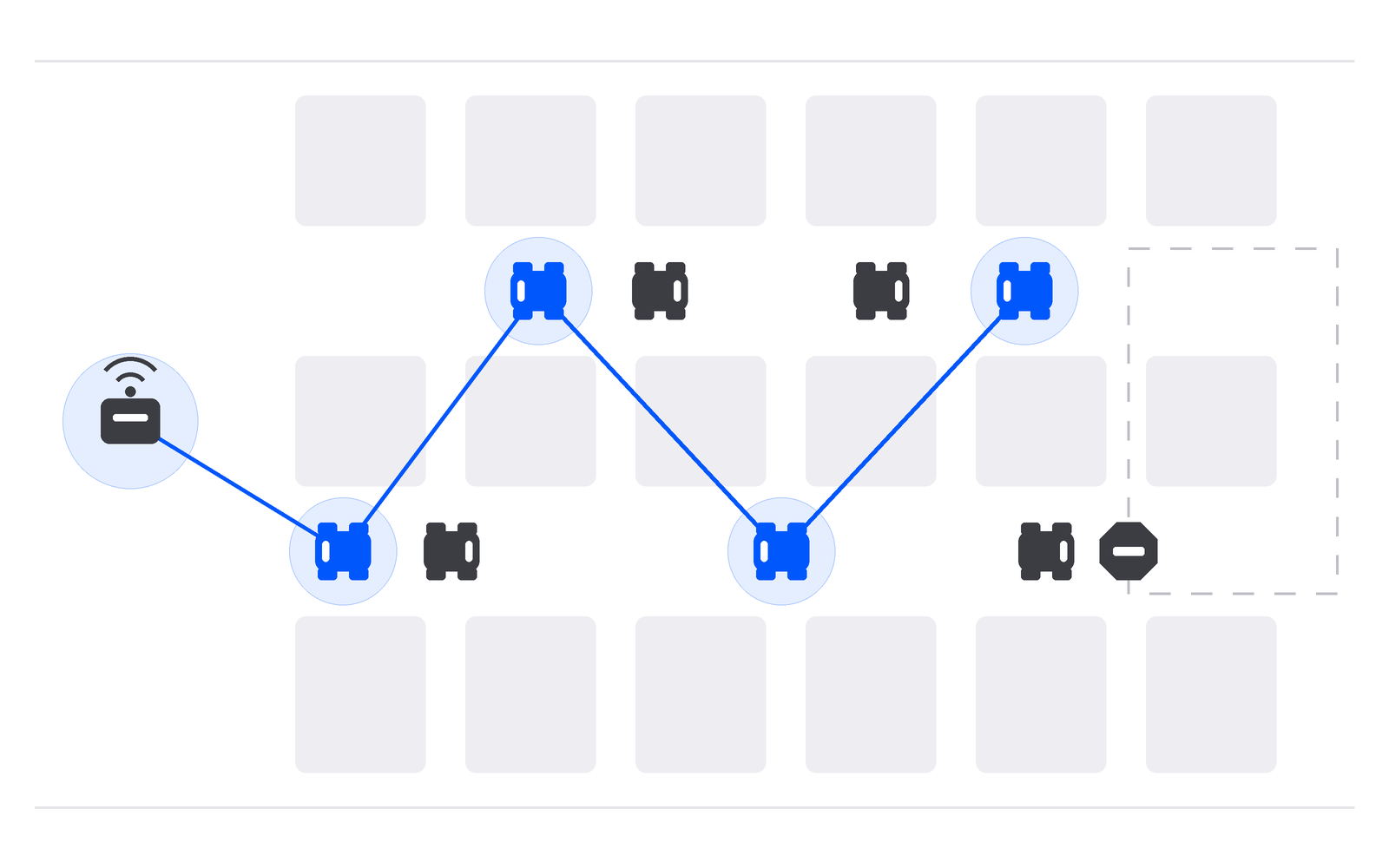
TL;DR
MeshRover is the autonomous robot fleet I built at ETHGlobal Mumbai on an Offline Protocol mesh, with no internet on any robot. Rovers relay for each other, a TEE-attested 0G model decides at checkpoints, and a rover with no answer in time stops safely.
Robots in warehouses, on farms, on construction sites and in disaster zones lose their network link all the time. When the brain they depend on is out of reach, most robot stacks carry on with a stale plan or fall back to a local guess that nobody audited, and the local radio link they fall back to is usually unauthenticated, so anyone in range can tell a robot to go.
I built MeshRover at ETHGlobal Mumbai: a robot fleet that runs with no internet on the floor and fails safe when its AI is out of reach. Rovers talk to their base station only over an encrypted Offline Protocol mesh, a vision model from 0G running in a TEE decides at each junction, a human approves risky moves with World ID, and the fleet roster lives on ENSv2. The source is at github.com/mizanxali/meshrover and the live dashboard is at meshrover.app.
MeshRover architecture: a base station and rovers on one mesh
MeshRover is a fleet of warehouse rovers and one base station. In the demo, two rovers drive a warehouse map. At every junction a rover sends its camera frame over the mesh to the base, the base asks a 0G vision model what to do, and the decision comes back over the same mesh with its 0G request ID. Only the base has an internet connection. The rovers have none, and neither does any mesh link between them.
 Miz@mizanxali
Built MeshRover at @ETHGlobal Mumbai.
Robots that never touch the internet.
Each one sends a camera frame to a central base over an offline mesh built with @OfflineProtocol, hopping through other robots along the way. The base asks a @0G_labs AI model running in a TEE and sends the decision back over the same mesh.
If the AI says stop, or the answer doesn't arrive in time, the robot stops safely.
Entering a restricted zone also needs a human: an operator approves with @worldnetwork ID on their phone.
The fleet is managed on @ensdomains v2: every robot and operator has a subname with a role and an expiry.
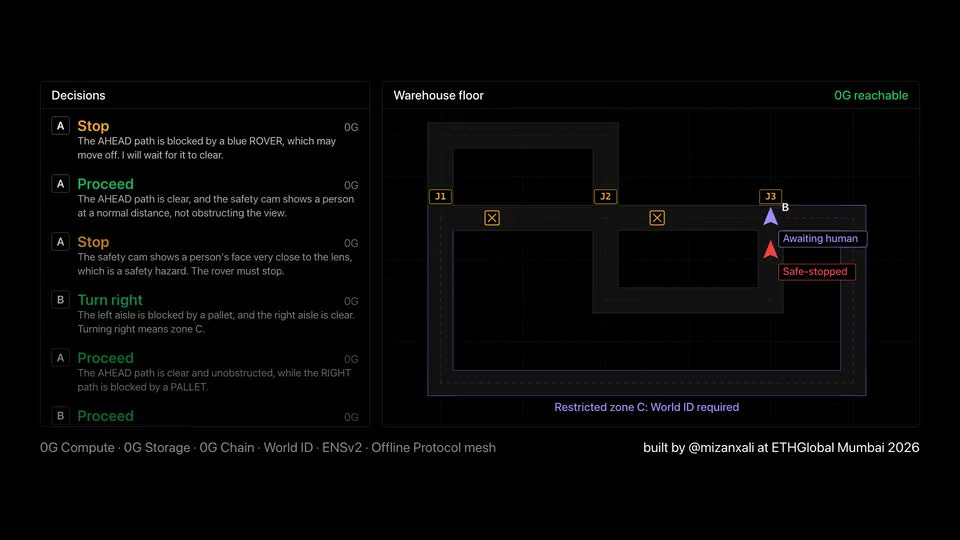
The rovers are simulated on a Mac for the demo, but each one already runs its own Offline Protocol engine and talks to the base only through that engine, never through the simulator. The base, rover A and rover B are three separate engines that share no memory, linked by loopback peer streams with no LAN. The base’s engine also runs Bluetooth LE, so operators join the same mesh from an iPhone or Android phone with the internet turned off. Rover A also has a real safety camera: the laptop’s webcam is part of its checkpoint frame, and a hand over the lens makes the model choose stop.
Moving to physical robots changes nothing in the mesh, the protocol or the safety checks: a physical robot runs the same engine with Bluetooth switched on in its config, and the simulator’s motion and camera are replaced with the robot’s own drivers.
Multi-hop relaying through other robots
In the demo, rover B peers only with rover A. Rover B never has a direct link to the base, so every camera frame it sends and every decision it receives is relayed by rover A’s engine. The operator app shows each phone’s hop count to the base and how many frames that phone has relayed for others.
This is the property that makes a mesh fit a fleet. Each robot that joins carries a radio, so it extends the area the fleet can cover instead of competing for a single access point. A rover at the far end of an aisle reaches the base through the rovers between them, and the robots don’t need a coverage map of the building to do it. Multi-hop relay is the SDK’s job: MeshRover sets an initial hop limit of 5 in its engine config and leaves routing to the engines.
Safe stop when a decision misses its deadline
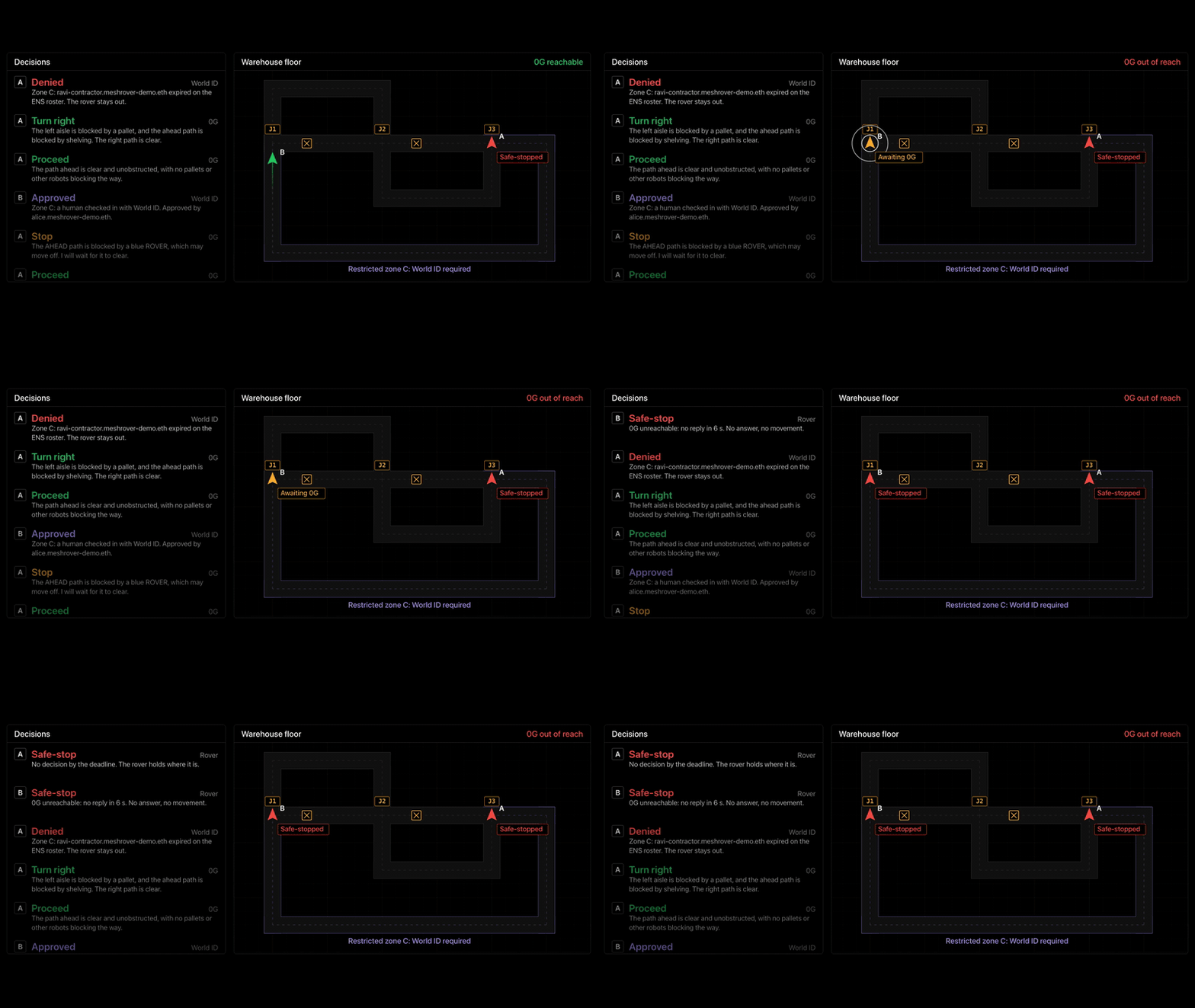
The central rule in MeshRover is that no brain means stop. A rover moves on only when a 0G decision answers its pending sequence number before a 6.5 second deadline. If the deadline passes, the answer doesn’t parse, it names an action the rover wasn’t offered, or the sequence number is wrong, the rover goes to SAFE_STOPPED. There is no local model, no default action and no cached plan.
The demo shows it directly. Turn off the base’s Wi-Fi and the next rover to reach a junction stops and says why, while the operator’s phone still sees it over Bluetooth. Turn the Wi-Fi back on and the rover retries with a new sequence number and carries on. A safety camera frame that is missing or more than 2 seconds old also means stop, so a dead camera can never mean carry on.
A mesh makes this rule practical. The rover’s question is simple: did a valid answer arrive in time over a link I trust? The mesh carries the request and the answer, the deadline turns silence into a decision, and the operator keeps watching the fleet over Bluetooth even while the base is cut off from the internet.
A local control loop with decisions at checkpoints
MeshRover splits the work into loops that need different things from the network:
| Loop | Runs on | Needs the network |
|---|---|---|
| Motion | The rover, 20 times a second | Never |
| Decision | Rover to base to 0G, at each checkpoint | Mesh and internet |
| Human checkpoint | Rover to base to World to operator | Mesh and internet |
| Record | Base to 0G Storage, then 0G Chain | Internet, afterwards |
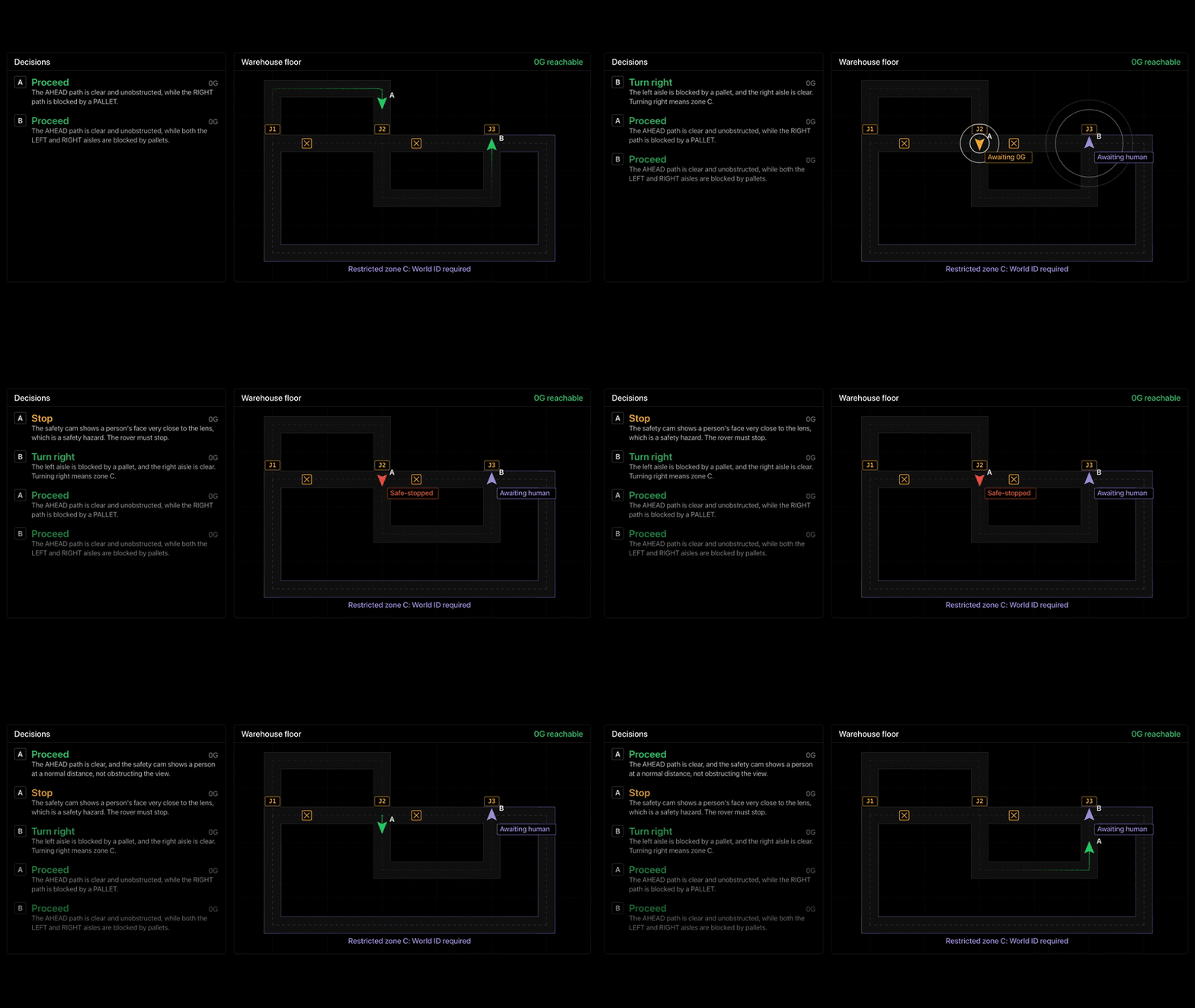
As I put it in the README, “0G is the brain, not the spinal cord.” Motion stays on the robot and never waits on the network, only checkpoints do, and nothing a rover does waits on a blockchain. That keeps the real-time part of the robot local and makes every remote dependency something the rover can wait on with a deadline. In the clip above, rover A’s safety camera sees a face close to the lens, so 0G answers stop; on the next frame the person is at a normal distance, and the answer is proceed.
Human approval with World ID over the mesh
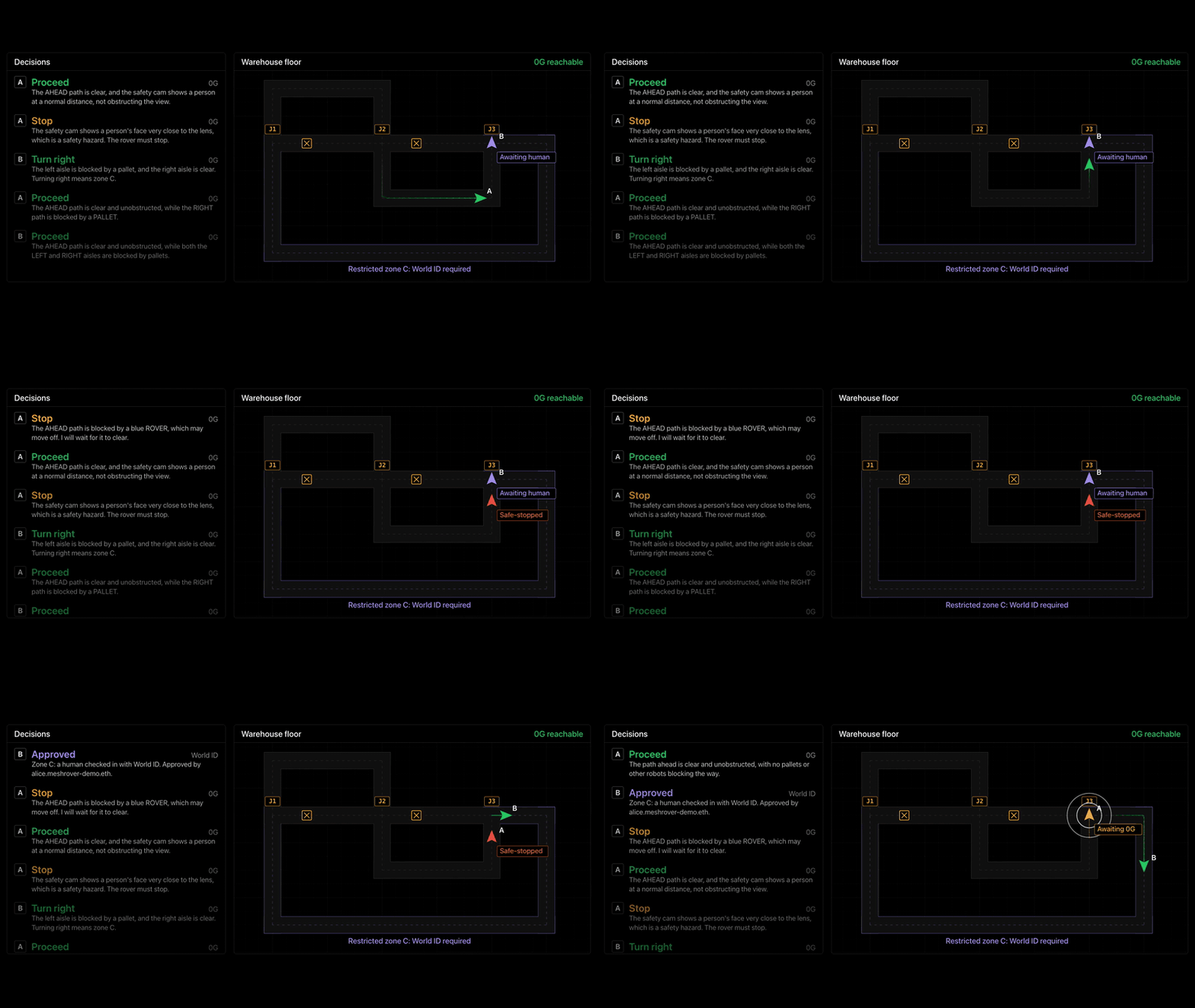
Before a rover enters restricted zone C, an operator has to approve with World ID on their phone. Robots have no browser, so the base runs World’s OAuth device flow, and the link and code travel to the operator’s phone over the Bluetooth mesh, the only place an approval can happen. The base validates the ID token itself, maps it to an enrolled fleet name and issues an approval that works once and expires after 10 seconds. If the operator cancels, the rover stays put, and World sub values are never logged or published. The dashboard in the clip only shows that a rover is waiting and what was decided; the approval itself happens on the operator’s phone.
Fleet roles and expiry on ENSv2
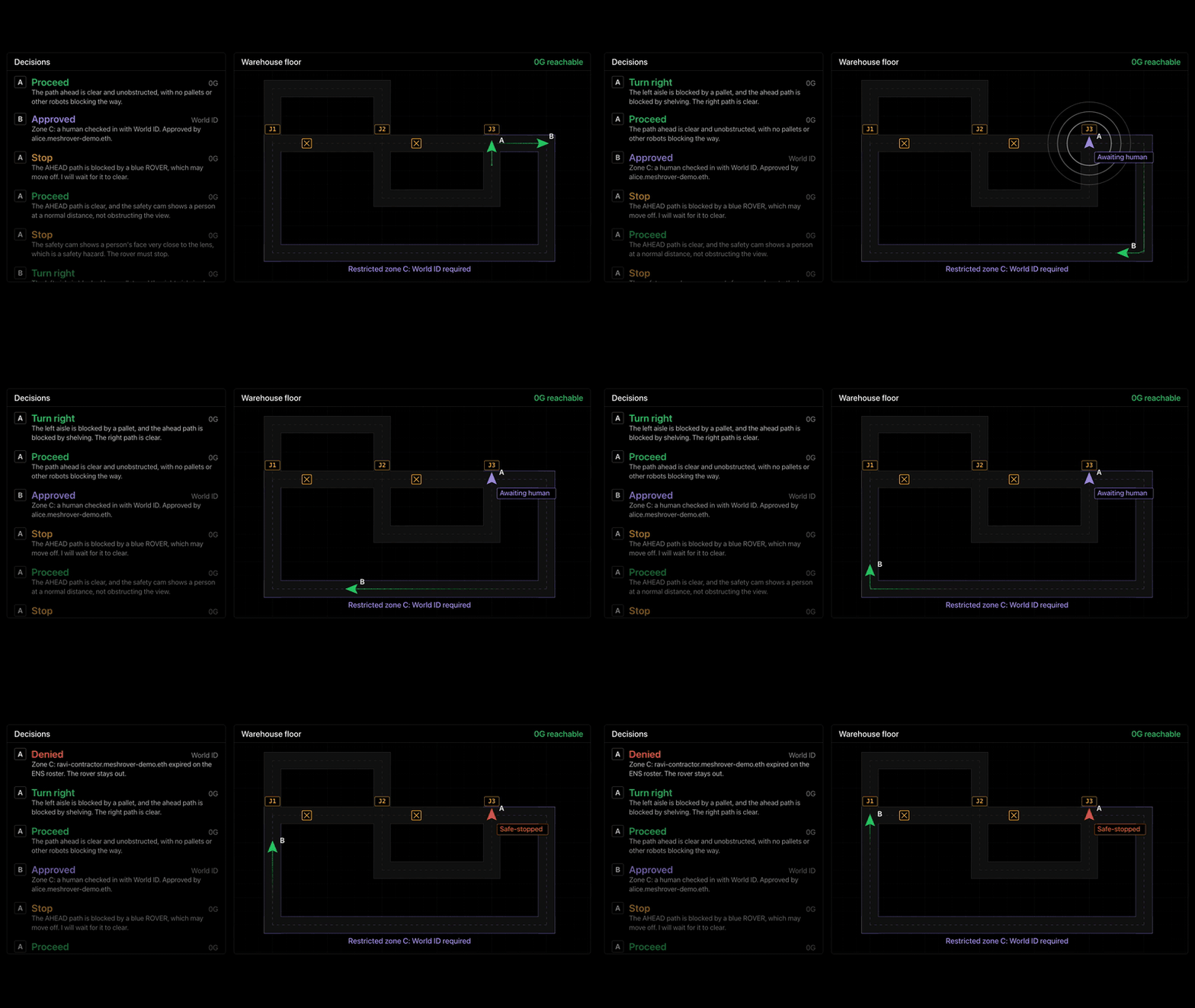
The fleet is an ENSv2 namespace on Sepolia, meshrover-demo.eth, with a subname for each robot, each operator and the base. Each subname has an expiry, and its text records hold its role and, for the engines, a signed mesh invite. The base reads the roster every 60 seconds, turns each invite into a mesh address with the engine’s parse_invite call and publishes the roster over the mesh. Rovers cache it, so expiries are enforced offline too.
Both the base and the rover check every command and approval with authorize(): expiry first, then role, then mesh key. In the demo, a contractor whose subname has expired tries to approve zone C and is refused. Revocation is not instant: a rover enforces cached expiries offline, but a removed name only reaches it at its next roster refresh.
An audit trail on 0G Storage and 0G Chain
The base calls the 0G Router in verified trust mode, with verify_tee: true, temperature 0 and JSON output, using 0gm-1.0-35b-a3b, a TEE-attested vision model. At startup the base checks that the model is listed, accepts images and is TEE-attested, or it refuses to start. A reply without tee_verified: true is treated as an error, never as a decision.
Every decision, with its 0G request ID and the exact frame the model saw, every safe stop, every approval and every denial goes into one log file. When an episode ends, the base uploads that file to 0G Storage and anchors its root on 0G Chain, retrying every 15 seconds while offline. The dashboard at meshrover.app lists the anchored episodes, replays each one from 0G Storage and shows the ENS roster.
Offline Protocol SDK services in MeshRover
MeshRover uses the Offline Protocol SDK 0.32.0. On the Mac, the base and each rover run the offline-protocol-service engine from the Python package and drive it through its local JSON-RPC API over a WebSocket. The engine config turns on required encryption, automatic key exchange and store and forward for pending messages, and turns the internet transport off.
The base exposes the fleet as five services on the mesh:
| Service | Kind | What it carries |
|---|---|---|
fleet.decide | Request | A rover’s checkpoint frame and options, answered with a 0G decision or an error |
fleet.approve | Request | A rover at a zone gate, answered after World ID with a single-use approval or a denial |
fleet.status | Subscription | Each rover’s state as the base last heard it, for the operator phones |
fleet.approvals | Subscription | The open approval cards, with World’s link and code |
fleet.roster | Subscription | The fleet roster from ENS, which each rover caches |
The base registers each one with services.register_service, answers requests with services.respond_to_service_request and publishes state with services.publish_service_update. A rover calls services.send_service_request at each checkpoint and subscribes to fleet.roster with services.subscribe_service. The operator app is React Native on @offline-protocol/mesh-sdk, with Bluetooth only and the internet off: it finds the base by discovering fleet.status with discoverServices, then subscribes to status and approvals with subscribeService. Subscriptions are the feature added in SDK 0.32.
Every message on the mesh is sealed with MLS. At startup, each rover and each operator phone sends the base one direct message to open the MLS session, and both sides then treat any unsealed fleet.* body as doubt, which means a stop. That is what makes the local link refuse a stranger’s command: a nearby radio can reach the mesh, but it can’t produce a sealed message from a key on the roster.
Patterns to reuse in an offline robot fleet
MeshRover is a hackathon build, and its ideas carry over to any fleet of machines that has to keep working when the network doesn’t. The Learning Center covers the wider question of how robots coordinate without a network; these are the patterns MeshRover adds to it:
- Model each capability as a service. Decisions and approvals are requests with an answer; status, approval cards and the roster are subscriptions. The robot code doesn’t care which link or how many hops carry them.
- Make silence a decision. Give every remote answer a sequence number and a deadline, and define what the machine does when the deadline passes. In MeshRover that is a safe stop, and the mesh keeps the operator informed while it holds.
- Keep the real-time loop on the device. Motion never waits on the network; only checkpoints do.
- Keep identity checks offline. A cached roster with roles, expiries and mesh keys lets each robot refuse a command without asking a server, and MLS rejects anything that isn’t sealed.
- Start with engines on one machine. MeshRover runs three engines on loopback before any hardware, which makes relaying and failure cases easy to reproduce.
Running MeshRover from source
You need a Mac, Node 22 or later, Python 3, Foundry, jq and ffmpeg, and an iPhone or Android phone for the operator app. No router or LAN is needed. Clone mizanxali/meshrover, install the dependencies and the offline-protocol-sdk 0.32.0 Python package, then run each part in its own terminal:
spikes/engines.sh    # three engines on loopback: base (with Bluetooth), rover-a, rover-b
npm run base         # the base station
npm run sim          # both rovers
npm run web          # the dashboard on http://localhost:5173
The base needs a 0G Router key and World client credentials in .env, and the README covers the operator app, World enrollment and the ENS fleet setup. To build your own fleet on the same pieces, start with the SDK quickstart and the documentation, read how Offline Protocol approaches robot fleets, and see MeshRover with the other apps developers have built on Offline Protocol.
Frequently asked questions
Do the robots in MeshRover need an internet connection?
No. Each rover talks only to the base station, over an encrypted Offline Protocol mesh. Only the base goes online, to ask the 0G model for decisions, verify World ID, read the ENS roster and record each episode on 0G.
What happens to a MeshRover robot when the AI cannot be reached?
It stops. A rover moves on only when a valid decision for its pending sequence number arrives before its 6.5 second deadline. A timeout, an answer that does not parse, an action it was not offered or a wrong sequence number all put it in SAFE_STOPPED, with no local model and no cached plan to fall back on.
How does a robot reach the base when it is out of range?
Through other robots. In the demo, rover B peers only with rover A, so everything between rover B and the base is relayed by rover A's engine. The operator phones join the same mesh over Bluetooth through the base.
Which Offline Protocol SDK does MeshRover use?
Version 0.32.0. The base and each rover run the offline-protocol-service engine from the Python package and drive it over its local JSON-RPC API, and the operator app uses @offline-protocol/mesh-sdk in React Native.
Are the MeshRover robots real hardware?
Not yet. The rovers are simulated on a Mac for the demo, but each one runs its own Offline Protocol engine and talks to the base only through it. Moving to physical robots means turning on Bluetooth in the engine config and swapping in the robot's own motion and camera drivers.
Can I run MeshRover myself?
Yes. The source is on GitHub at mizanxali/meshrover. You need a Mac, Node 22 or later, Python 3, Foundry, jq and ffmpeg, plus an iPhone or Android phone for the operator app, and no router or LAN.