hopchat: smart home control with a shared local model and a peer-to-peer terminal chat

TL;DR
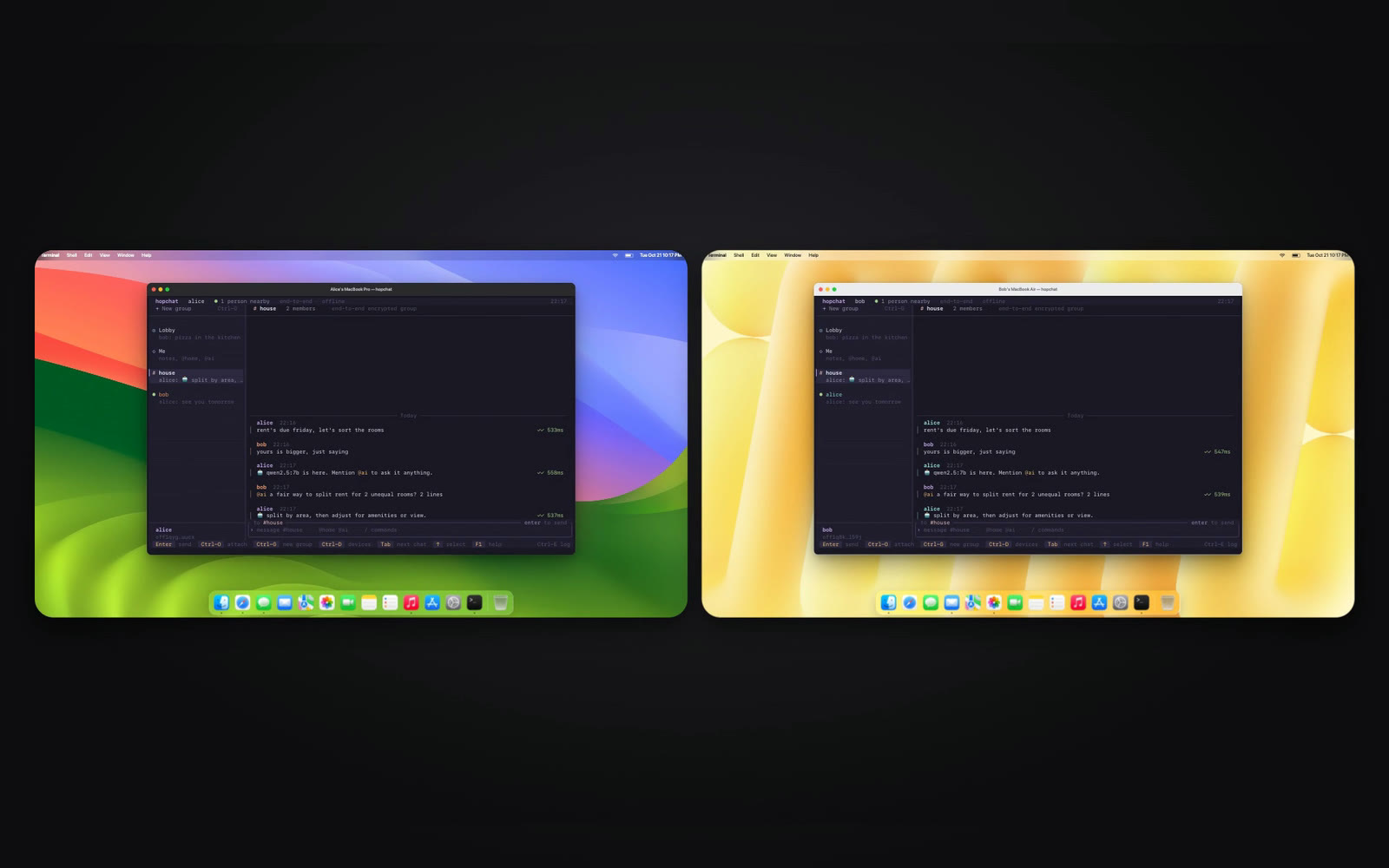
hopchat is my open-source Rust terminal chat on the Offline Protocol SDK and ratatui. Machines on one network find each other with no server or accounts, and every conversation is MLS encrypted. It also drives smart lights and shares one local model with a group.
Sending a message to someone at the next desk usually means a round trip through a server neither of you runs, and an account for each of you on it. The two laptops are already on the same network, so they should be able to find each other and talk directly.
So I built hopchat, a terminal chat app in Rust on the Offline Protocol SDK 0.30.0 and ratatui. Run it on two machines on the same network and they find each other with no server and no accounts, and every conversation is end-to-end encrypted with MLS. It also drives Wiz lights and LG TVs from the chat and lets a group share one local model. It’s MIT licensed at github.com/bahdotsh/hopchat, about 10,400 lines of Rust, and below is each feature with the file to open if you want to change it.
Peer discovery on a local network without a server
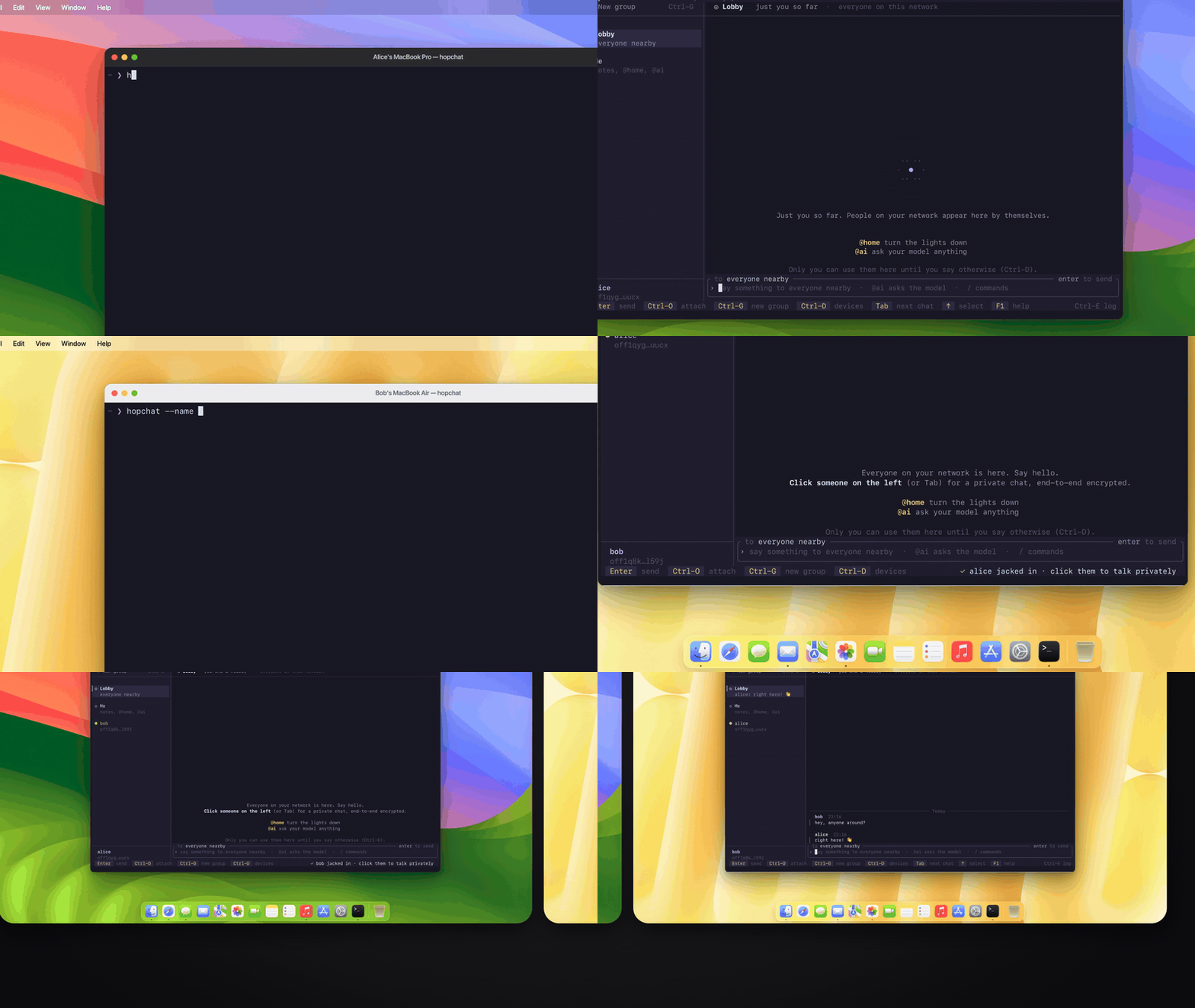
Start hopchat with a name and it announces itself. Every two seconds it sends a UDP multicast beacon to 239.255.42.99:47999 with its address, a TCP port and a nickname. When two copies hear each other, the one with the lower address dials, and they keep one TCP connection per peer. The first frame each way is the SDK’s signed identity assertion, which the other side checks with verify_identity_assertion before it accepts anything else. The nickname in the beacon is only for display; a peer is known by the off1… address its assertion proves.
Your identity is a key on disk under ~/.hopchat/<name>, so there is nothing to sign up for. Everyone running hopchat on the network lands in the Lobby, a room you never have to create or invite anyone to.
The whole network side is src/net.rs, 206 lines. The SDK does no I/O of its own, so this file is the bridge: it finds peers, opens the streams and feeds frames to the engine.
End-to-end encrypted direct messages with MLS
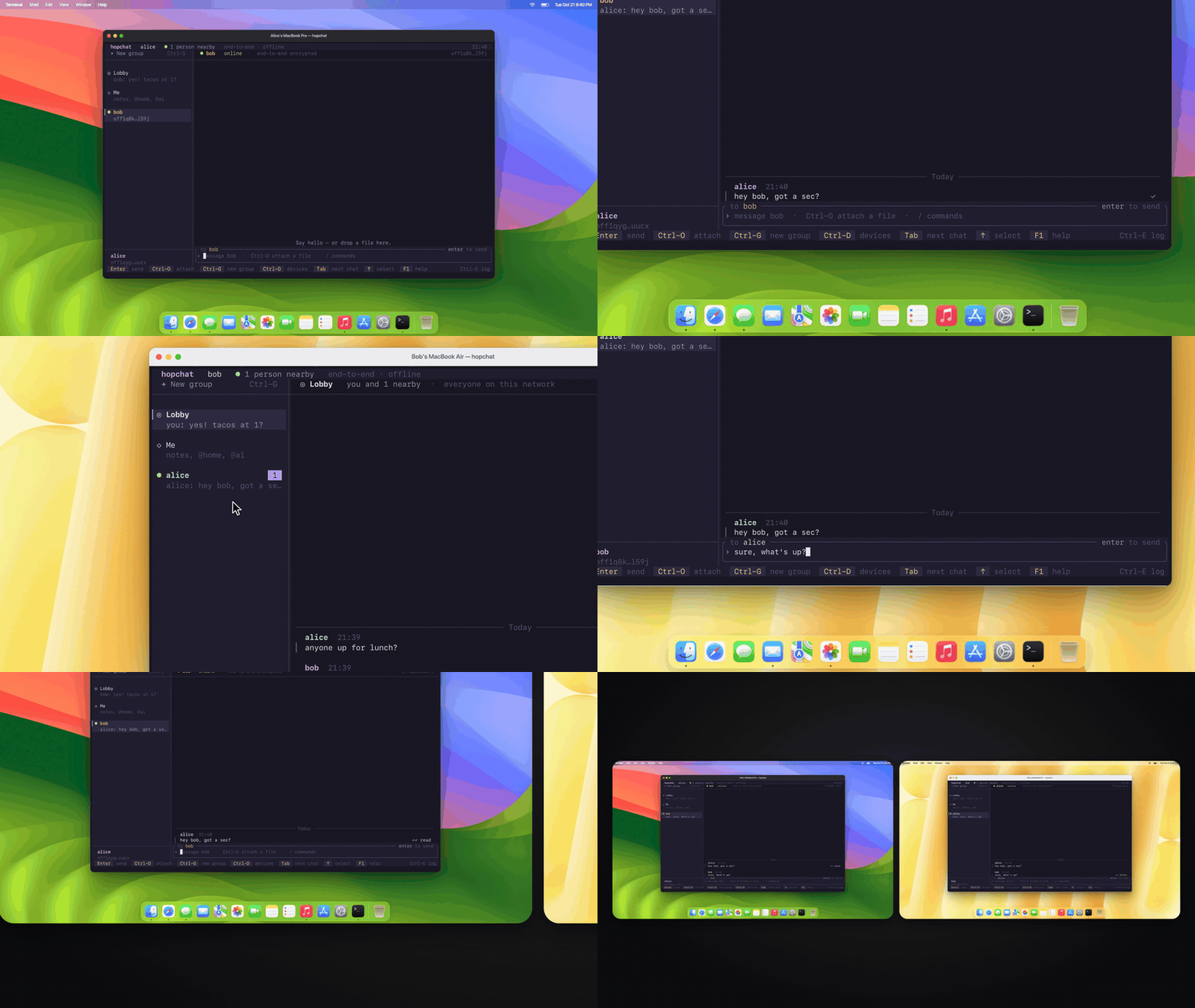
Click a name in the sidebar and you’re in a private chat. An MLS (RFC 9420) session is set up as soon as the two of you see each other, and direct messages, groups and the lobby all travel inside MLS. History on disk is sealed with XChaCha20-Poly1305 under a per-profile key.
Every message shows where it is: ◷ queued, ✓ sent, ✓✓ delivered, a highlighted ✓✓ read, and ✗ failed, where R retries it. Replies with a quote, typing indicators and unread badges are there too. The read receipt comes straight back from the other machine, so nothing in the middle keeps track of who read what.
src/engine.rs is the SDK wiring: 1,172 lines that own the OfflineProtocol instance on one thread. Typing and read receipts are one SDK call each, send_typing_indicator and send_read_receipt, and receipts go out in batches of up to 256 message ids.
Encrypted file transfer on a local network
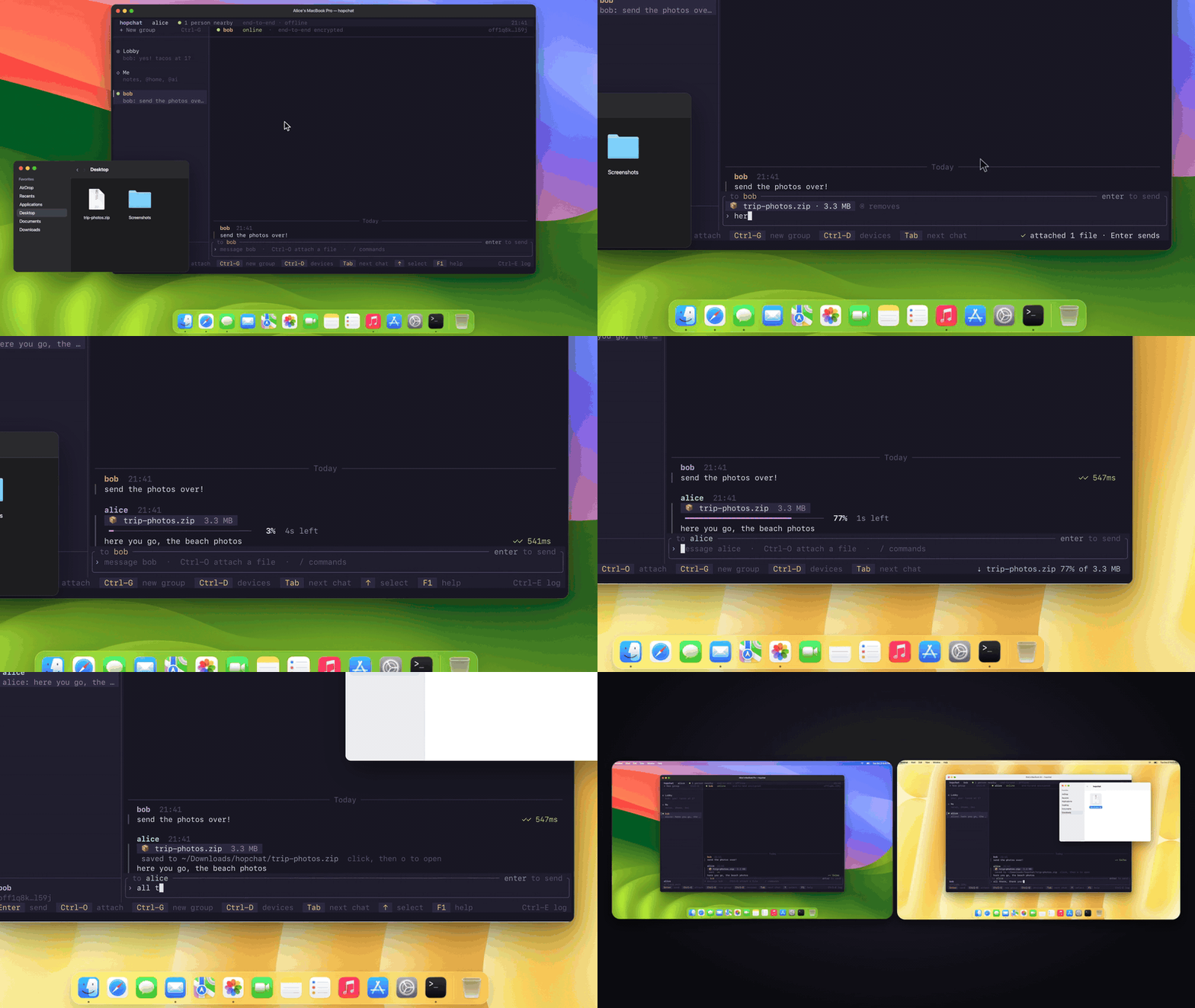
Drag a file onto the window, press Ctrl-O for a file browser, or type /file PATH. Files up to 100 MB go across chunked and encrypted, with live progress, rate and time left on both ends. Up to two transfers run per peer at once and the rest wait in a queue, and a transfer cut off by quitting resumes on the next run.
Received files land in ~/Downloads/hopchat. The name is sanitised first, so a file can never end up outside that folder or overwrite one that’s already there.
The size limit is one constant, MAX_FILE_BYTES in engine.rs. Further down, start_files hands queued files to the SDK’s send_media_with and keeps any that can’t start yet in line, either because the session isn’t ready or because the SDK’s transfer limit is reached.
Offline message delivery between peers
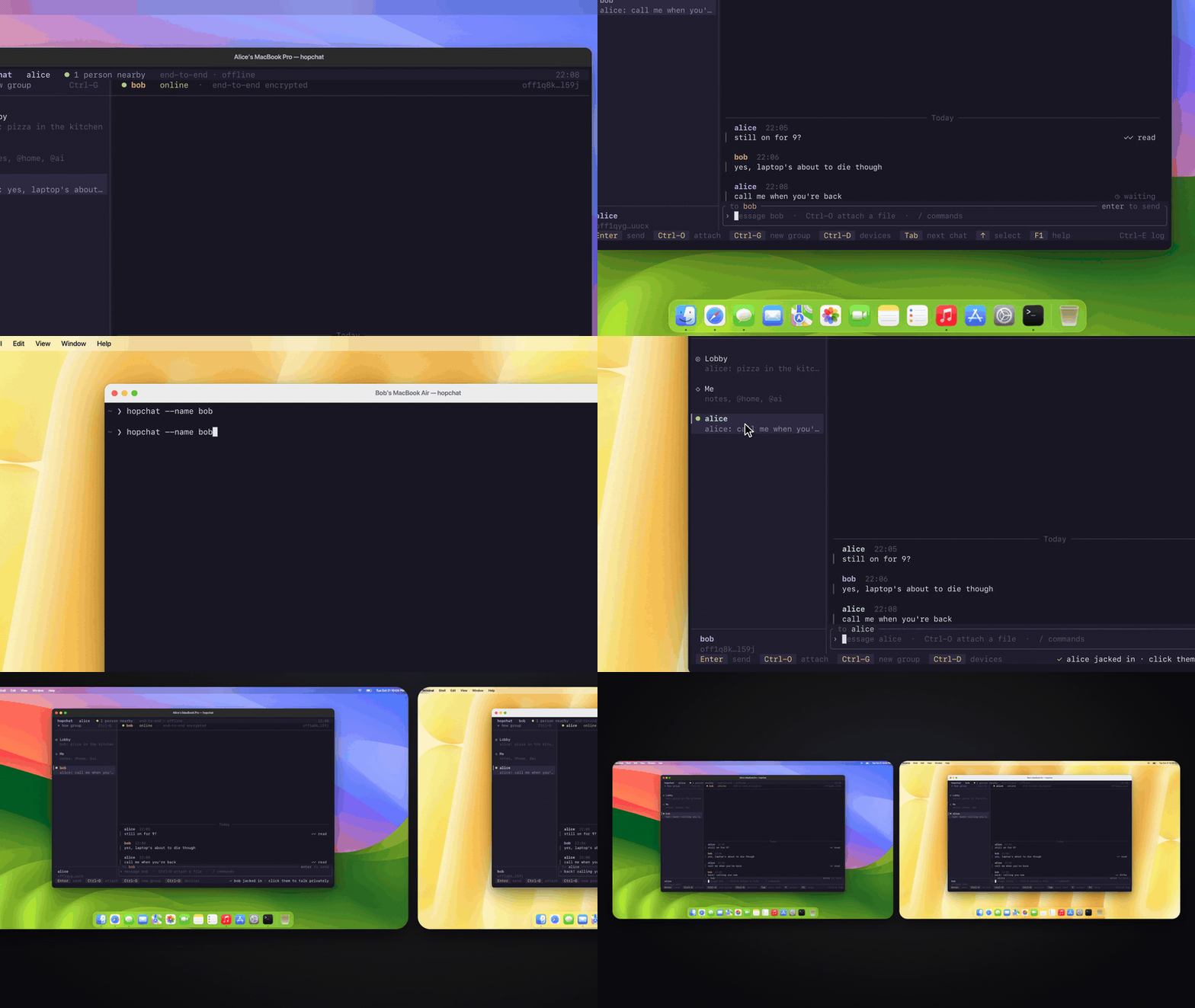
Close your laptop in the middle of a conversation and nothing is lost. A message written while the other person is away shows ◷ waiting on the sender’s side and goes through when they’re back on the network. There is no inbox server holding it, and history survives restarts on both machines.
The lobby works differently: it’s a room, not a mailbox. A lobby message goes to whoever is connected when you send it, people who join later don’t see earlier messages, and there are no delivery ticks.
The waiting state is one match arm in src/ui/mod.rs: the SDK’s MessageDeferred event becomes Status::Waiting, and render.rs draws it. hopchat sends the message once; holding it and retrying until the peer is back is the SDK’s job.
Smart home control from chat with a local model
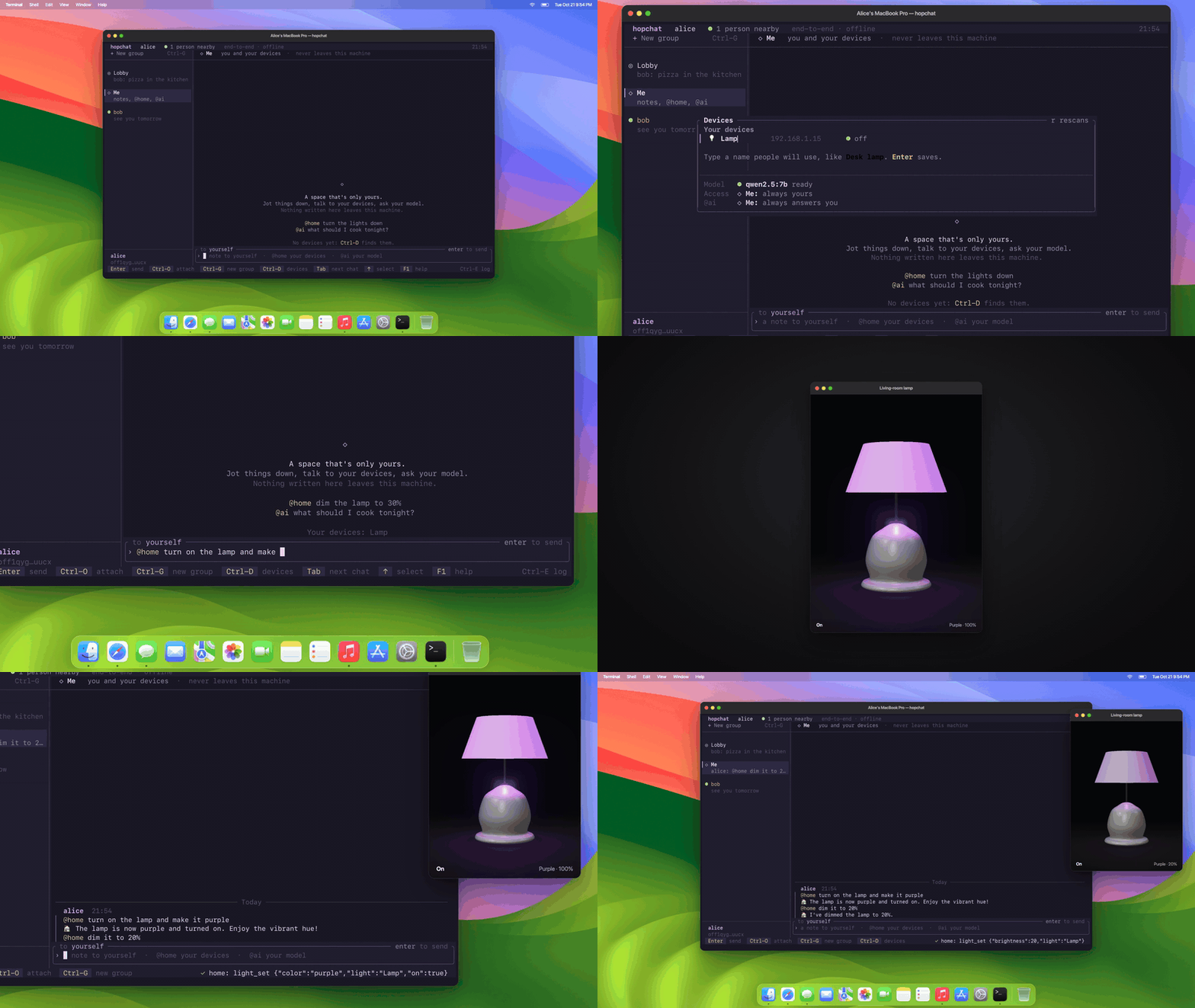
Smart lights usually need their own app, an account and a cloud round trip. In hopchat you mention @home in Me, the lobby or a group, and plain English becomes device actions: “@home make the lamp purple”, “@home dim the lights to 20% and put on netflix”. A local Ollama model that can call tools, qwen2.5:7b by default, gets one tool per thing your devices can do, and home replies in the conversation with 🏠.
Press Ctrl-D for the Devices panel. It scans the network for Wiz bulbs and LG webOS TVs; Enter adds a light, t blinks it so you can tell which one it is, and n names it. Devices are tracked by MAC address, so a new IP from the router doesn’t lose them, and a white-tones bulb is never asked for a colour. Wiz bulbs are driven over local UDP on port 38899, and LG TVs over their WebSocket API on port 3001 with TLS, with the TV’s certificate pinned at pairing.
src/home/wiz.rs is the whole Wiz driver: 293 lines of JSON datagrams over UDP, with no pairing. The tool-calling loop is src/home/assistant.rs, 367 lines, with up to four model turns per request, light_set and light_status for bulbs and seven tv_ tools for the TV. If you have another gadget on your network that speaks UDP, wiz.rs is the template to copy.
Sharing one local AI model across a group
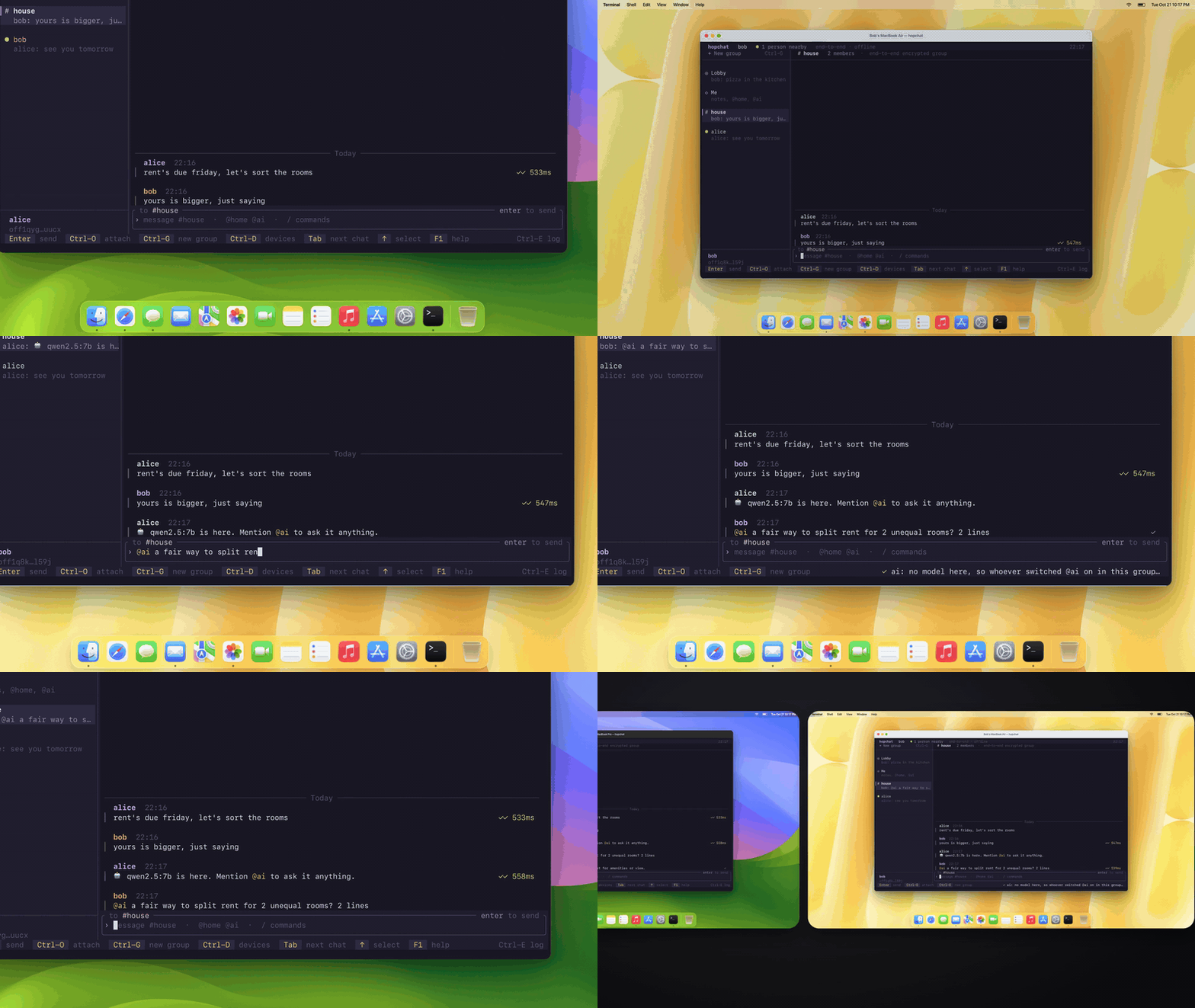
@ai asks a local model anything, in any conversation, and follow-ups like “and in French?” work because each conversation remembers its recent questions. Not every laptop can run a model, and only one person in a group needs to. Type /ai on in a group and everyone there can ask yours; on a machine without a model, hopchat notes that whoever switched @ai on in the group answers.
Lending goes one step further. A machine whose model is ready offers it to the peers it’s connected to. If the person hosting the devices has no model, home sends each reasoning step to a lender and still runs the device actions itself, so the borrowed model only thinks and never touches the devices. A lender answers only people it shares a group with, at most two requests at a time, and the requests travel inside the same encrypted one-to-one session as chat without ever showing up as messages. /ai share off stops lending.
src/home/lend.rs is 152 lines. The wire format is a five-variant serde enum (Have, Gone, Ask, Turn, Fail) sent as hidden one-to-one messages, and a borrower waits up to 150 seconds per turn and tries up to three lenders. The two-request cap is MAX_LENDING in home/mod.rs.
Group membership as smart home permission
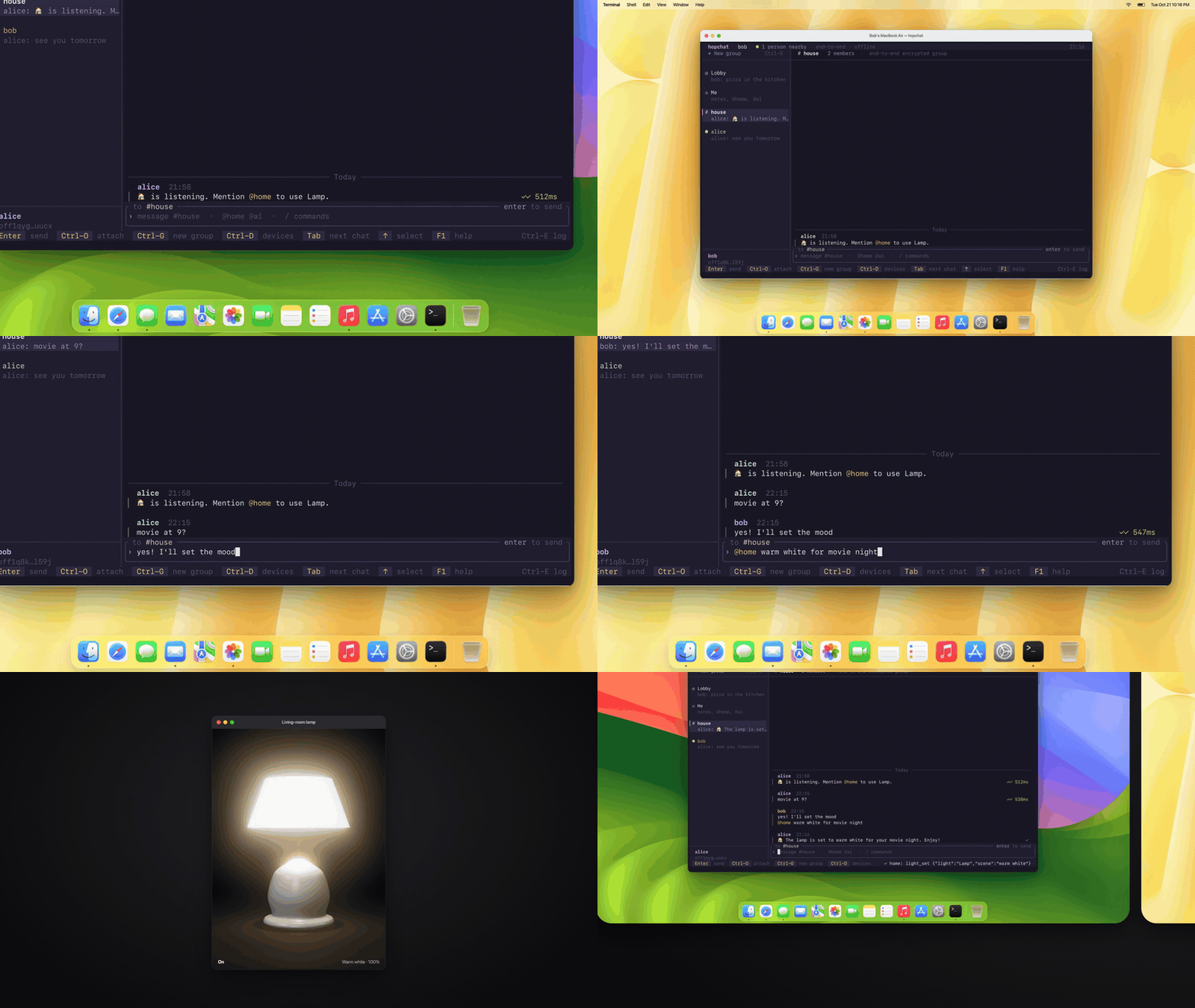
Giving someone access to your smart home usually means handing over a password or adding them to your account. In hopchat the group is the permission. Press g in the Devices panel or type /home on in a group, and everyone MLS has admitted to that group can use your devices, and nobody else can. /home off takes it back. You can always use your own devices, and home only answers while your hopchat is running.
The check is answers() in src/home/mod.rs, a single expression: home answers everyone in a group where it’s switched on, and the person at the keyboard in Me, the lobby and any group where this machine has devices. Deciding who is in the group is MLS’s job.
Headless mode for bots and scripts
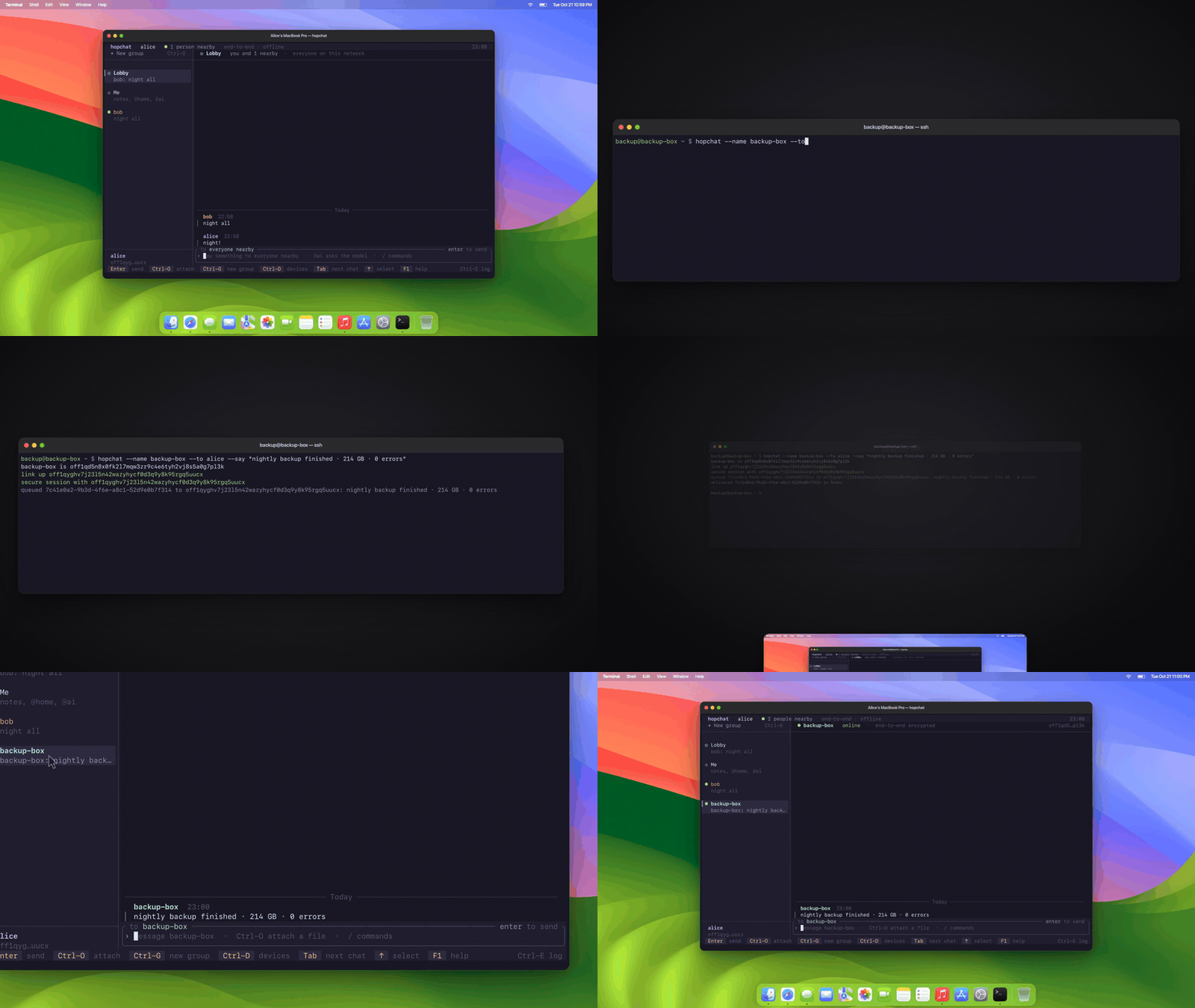
hopchat also runs without the UI, so scripts, bots and test rigs join as peers like anyone else. One line in a cron job does it:
hopchat --name backup-box --to alice --say "nightly backup finished"Without --to, the message goes to the first peer whose secure session comes up. --file PATH sends a file, --lobby says it in the lobby, and --group NAME creates a group and invites peers as they connect, with --home or --ai to share that machine’s devices or model with the group.
--echo is a bot that answers every message and file, and it’s the quickest way to test without a second machine: cargo run -- --name bot --echo in one terminal and cargo run -- --name alice in another. The whole mode is headless() in src/main.rs.
Protocol event log for debugging
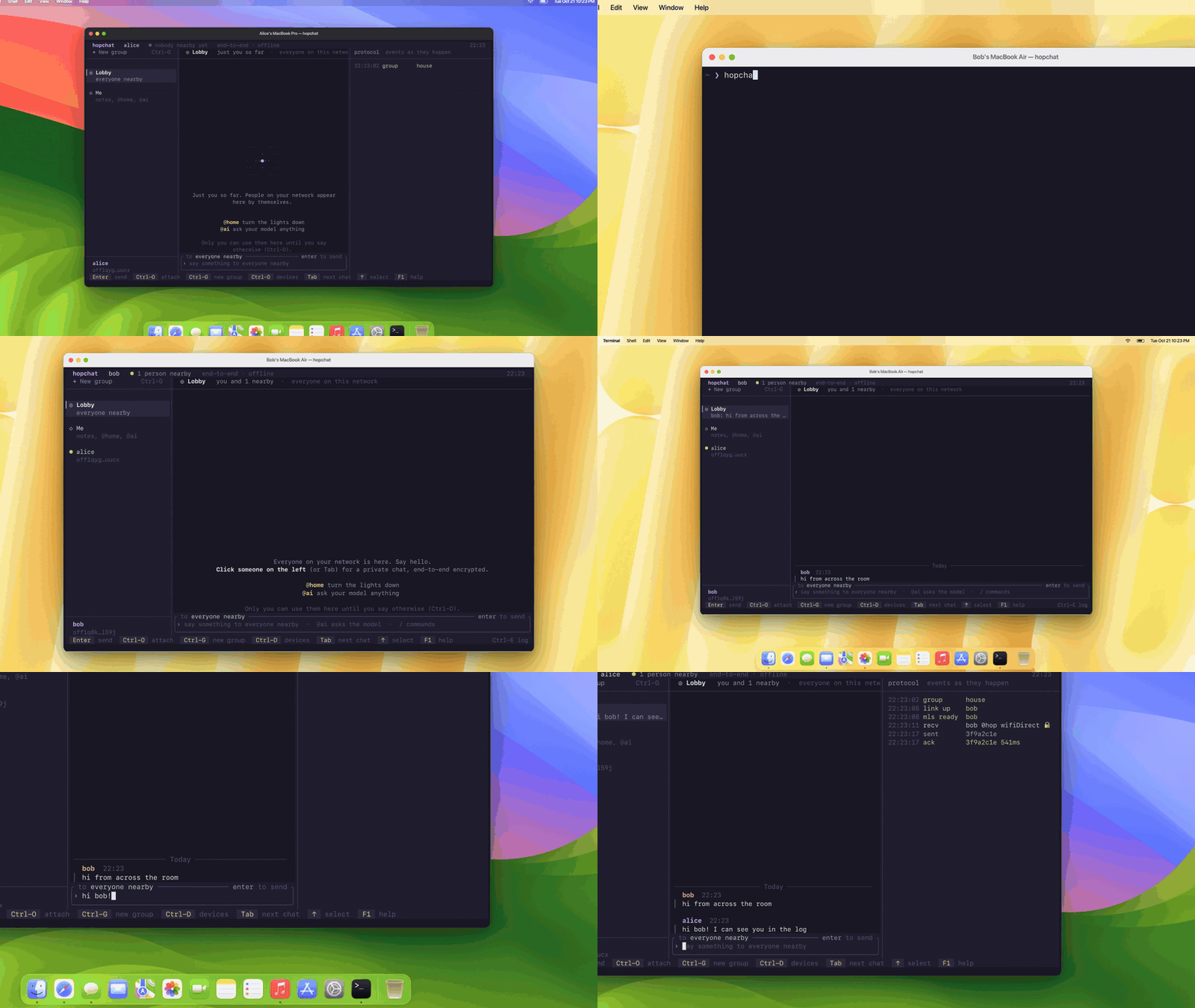
Ctrl-E, or /log, opens the protocol log beside the chat, so you can watch a connection come up and every message move. You get link up when a stream proves who is on the other end, mls ready when the encrypted session is set, recv with the hop count, the transport and 🔒 for an encrypted message, sent, and ack with the delivery latency. Deferred messages, retries, failures and relays show up there too.
The transport in those lines reads wifiDirect because that’s the name of the SDK’s peer-stream slot hopchat plugs its streams into. The link itself is TCP on your local network, after UDP multicast discovery.
The log is describe() in src/ui/render.rs, 55 lines that turn each SDK event into one line. If you want to restyle the whole app, the look lives in src/ui/theme.rs, 128 lines of soft pastels on a dusk background.
Installing and running hopchat
You need Rust 1.88 or newer, macOS or Linux, and a network that allows UDP multicast. Install it from GitHub, then run it on two machines:
cargo install --git https://github.com/bahdotsh/hopchat

hopchat --name alice    # on one machine
hopchat --name bob      # on another
Two terminals on one machine work too, because each name gets its own identity under ~/.hopchat/<name>. Both of you start in the lobby; click the other name to talk privately, and press F1 for every key and command. For @home and @ai, start Ollama with a model that can call tools:
ollama serve
ollama pull qwen2.5:7b
hopchat source code map
| File | Lines | What to change there |
|---|---|---|
src/net.rs | 206 | Discovery beacon and the TCP streams |
src/engine.rs | 1,172 | SDK wiring, sending, receipts, file queue |
src/lobby.rs | 68 | The lobby, sent as hidden one-to-one messages |
src/home/wiz.rs | 293 | Wiz bulb driver |
src/home/webos.rs | 415 | LG webOS TV driver |
src/home/assistant.rs | 367 | The @home tool-calling loop |
src/home/lend.rs | 152 | Lending and borrowing a model |
src/main.rs | 419 | Flags and headless mode |
src/ui/theme.rs | 128 | Every colour in the app |
hopchat pins offline-protocol 0.30.0, with the -core, -mls and -transport crates at the same version, and ratatui 0.30.2 in Cargo.toml. ratatui does all of the drawing, and the Offline Protocol SDK does identity, MLS sessions and transport; what’s new in that release is in the SDK 0.30 notes. Clone hopchat, run cargo test, and build something of your own on top of it.
Frequently asked questions
Does hopchat need a server or an account?
No. Peers on the same network find each other with a UDP multicast beacon and connect over TCP, one connection per peer. Your identity is a key on disk under ~/.hopchat/<name>, so there is nothing to sign up for.
Is hopchat end-to-end encrypted?
Yes. Direct messages, groups and the lobby all travel inside MLS (RFC 9420) through the Offline Protocol SDK, and history on disk is sealed with XChaCha20-Poly1305 under a per-profile key.
What transport does hopchat use between machines?
TCP over the local network, after peers find each other with UDP multicast. The protocol log shows wifiDirect because that is the name of the SDK peer-stream slot hopchat plugs its TCP streams into, not the radio in use.
Which smart home devices can hopchat control?
Wiz bulbs over local UDP on port 38899 and LG webOS TVs over their WebSocket API on port 3001 with TLS. Requests in plain English go through a local Ollama model that can call tools, qwen2.5:7b by default.
Do I need a local model to use hopchat?
Only for @home and @ai, and only one person in a group needs one. Chat and file transfer work without a model, and a machine without one can borrow a group member's model over the encrypted session.
What do I need to run hopchat?
Rust 1.88 or newer, macOS or Linux, and a network that allows UDP multicast. Install it with cargo install --git https://github.com/bahdotsh/hopchat and run hopchat --name alice on one machine and hopchat --name bob on another.